For project-based businesses
Xero Project Reporting
for Service Businesses
Profit by job, case or client, read from the codes your team already types into Xero.
- Profit by job, case or project
- Overheads split your way
- Cash across every client

What Your Business Can Do With Cheetah
See what every job really made, then keep the cash in view between them.
Know what each job made
Every job, costed from Xero
Your jobs are already in Xero, in references, descriptions and tracking.
Cheetah reads them by your rules, so each job carries its own costs.
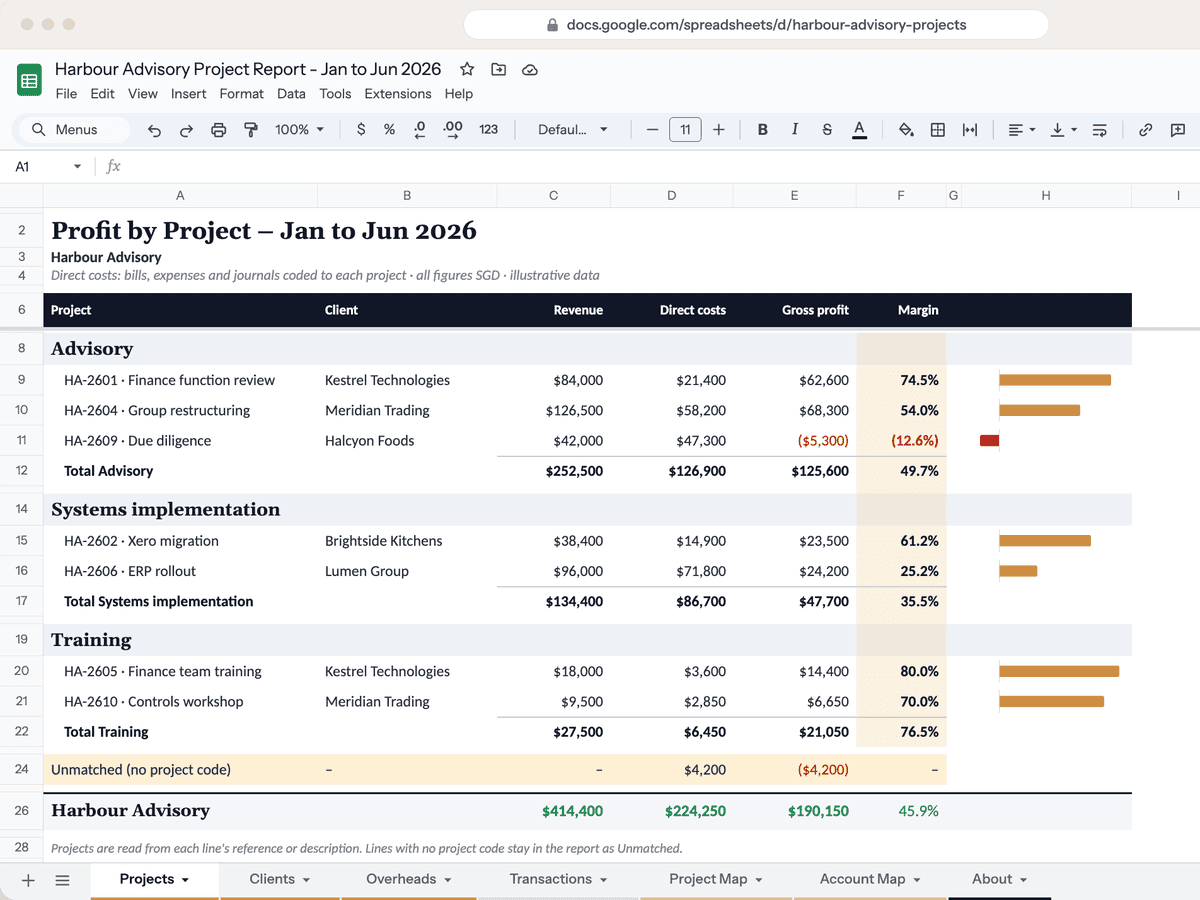
Profit by job, case or project
Each job's revenue, direct costs and margin, rolled up by service line, with the client beside it. Lines with no job code are kept as Unmatched and never dropped so the subtotal matches your P&L.
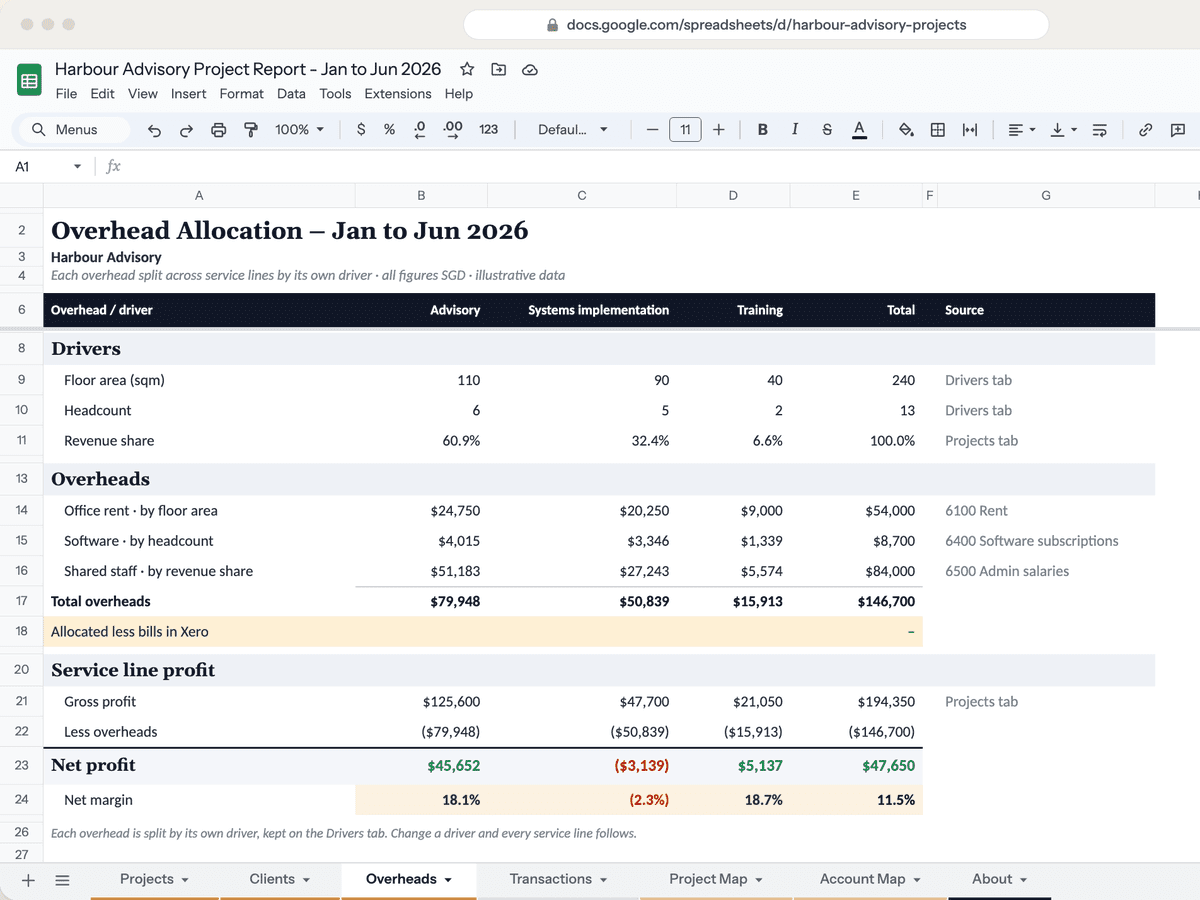
Overheads split your way
Rent, software and shared staff costs split across service lines or teams by headcount, floor area or revenue share. The same rule every month, as formulas you can trace.
Between jobs
Keep the cash in view
A profitable job still has to be paid for.
See who owes you, and how much of the business rides on one client.
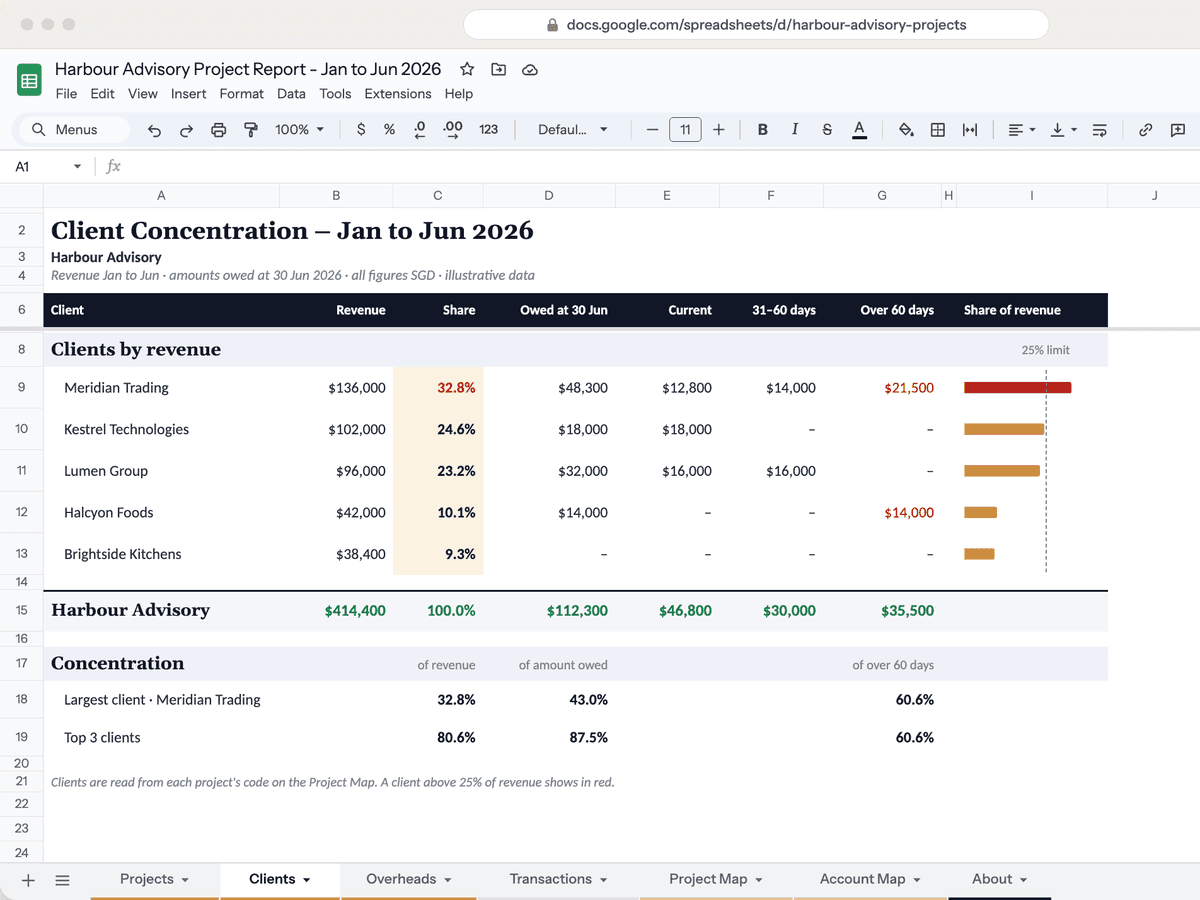
Cash across every client
What each client owes and for how long, and how much of your revenue rests on your biggest few. A large client who pays slowly shows up before it becomes a cash problem.
Ask Cheet (beta)
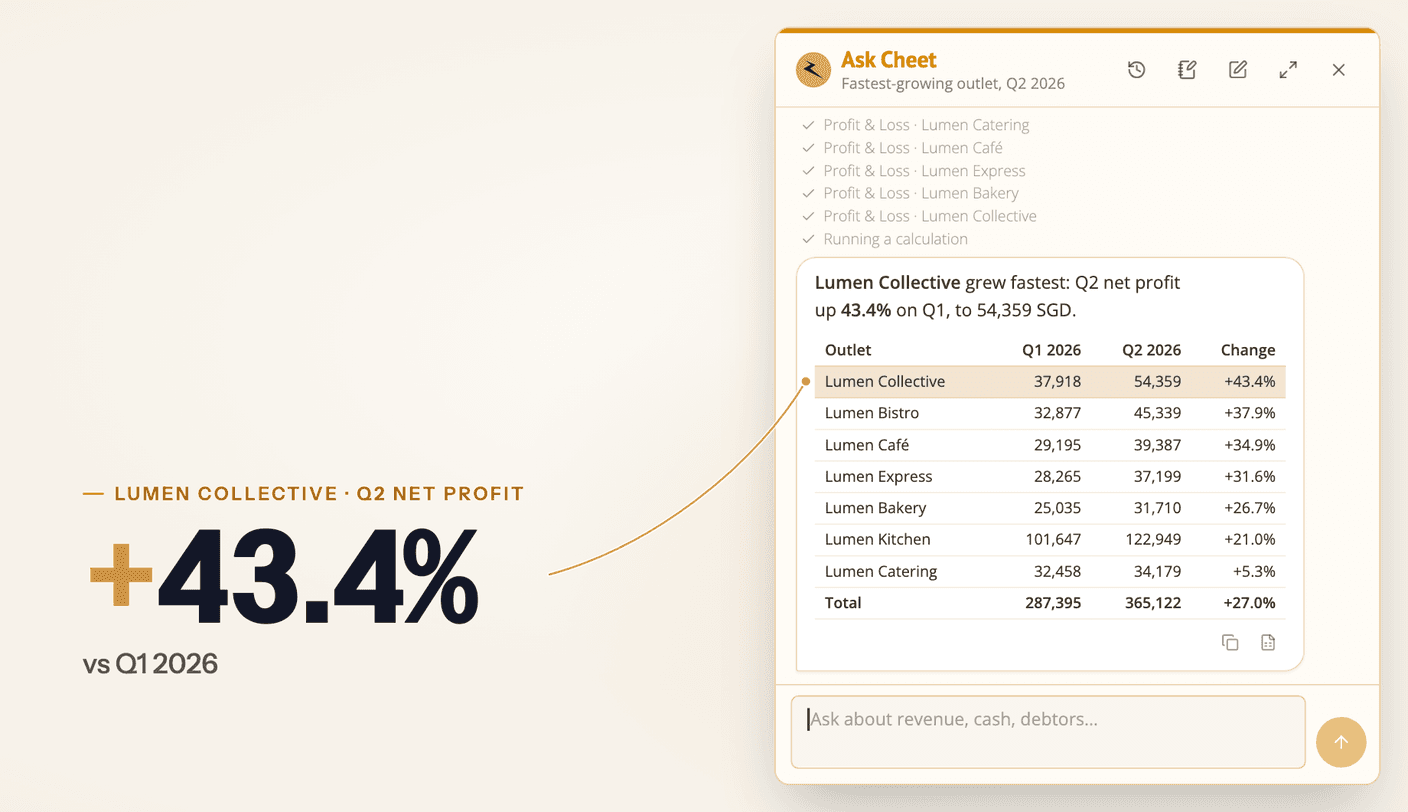
Open-ended questions, down to the ones no report covers: which jobs picked up subcontractor bills after their final invoice, or how much travel never got billed back to clients. Answers come back as tables and charts.
From Your Job Spreadsheet to One Click
You show us how you cost a job. We build it. Your team runs it.
Walk us through how you cost a job today: where the job code lives, which costs count and how overheads are shared.
We write your rules into the report and check the first run against a month you've already closed.
Pick a period and hit Generate. New jobs and clients appear on their own.
Every job's margin traces back to the invoices, bills and journals behind it, in Google Sheets you can export to Excel or PDF.
What's Included
Everything in the finance teams plan.
Unlimited reports and users
Every report the business needs, for everyone on the team. No per-seat pricing.
Your rules, not a template
Your job codes, your cost rules and your layout, built for your business.
Nothing silently dropped
Lines without a job code are listed as Unmatched, so the jobs always add up to the books.
Read-only Xero access
Cheetah only reads from Xero and never changes your books. Figures are pulled fresh on every run.
Live formulas you can trace
Every number in the sheet is a formula back to its source, not a pasted value.
Ongoing support and fixes
You work directly with the person who builds your reports. When the way you work changes, the reports do too.
You pay only after you're happy with the report.
What Clients Say
On reports built around the way their business actually works.
“We never thought our complicated business logic could be built into a systemised report until Cheetah delivered it. Whenever we need changes made, we get the responsiveness of a dedicated analyst.”

“Chanced upon Cheetah whilst looking for a customised tool to build reports from Xero data. Cannot be happier with the customisation and efficiency of Jarvin. Takes hours off manual work with Excel.”
“Great integration that solves many pain points we experienced in building custom reports from Xero. Seamless and reliable 👍”
“We never thought our complicated business logic could be built into a systemised report until Cheetah delivered it. Whenever we need changes made, we get the responsiveness of a dedicated analyst.”
“Chanced upon Cheetah whilst looking for a customised tool to build reports from Xero data. Cannot be happier with the customisation and efficiency of Jarvin. Takes hours off manual work with Excel.”
“Great integration that solves many pain points we experienced in building custom reports from Xero. Seamless and reliable 👍”
Project-Based Businesses FAQ
Common questions from project-based businesses about Cheetah.
Doesn't Xero report profit by project already?
Partly. Xero Projects tracks time, estimates and expenses against each project, but its staff costs come from rates entered by hand and its figures don't flow into your profit and loss. Tracking categories keep the numbers tied to the ledger, but only two can be active at once, so a project category uses one of them. Our guide to Xero project profit and loss compares the two.
Do we still need our job management app?
Yes, if you quote, schedule or track time in one. Cheetah doesn't replace it. It reports on what reaches Xero: the invoices, bills, expenses and journals, sliced by job the way your business runs.
Our team doesn't enter job codes the same way every time. Is that a problem?
Usually not. We read the code from wherever it turns up: a tracking category, the contact, the reference, the invoice number or the line description, in the order you choose. Anything we can't place is listed as Unmatched, so you can see what still needs a code instead of losing it.
We invoice up front or in stages. Does that distort the margin?
It can, because an invoice date isn't the month the work was done. Your timing rule, such as a service month tagged on the invoice or journal, moves revenue into the month it was earned, so a job billed in advance doesn't show one great month and one terrible one.
How long does setup take?
Most businesses are live in about a week, depending on how many rules the report needs. After that, each month-end is one click, and a new job or client simply appears in the next run.
How is Cheetah priced?
A one-off setup per report, then a monthly plan with unlimited reports and users. The details are on the pricing page. Every plan includes a 30-day free trial with no card required, and you pay only after we deliver a report you're satisfied with.
Where does our data end up?
In Google Sheets, exportable to Excel, PDF or CSV. Cheetah holds your Xero connection and your mappings, and pulls the figures fresh from Xero on every run.
