

Trusted by Modern Finance Professionals










and 100+ other organisations
Why Cash Flow From Xero Still Ends in Excel
Xero shows that the bank balance moved. Not why, what's coming, or whether your version agrees with it.
Where the cash went is a monthly rebuild
Splitting the bank movement into operating, investing and financing, then tying it back to the bank balance, is a spreadsheet rebuilt every month. The gap to the bank usually gets plugged.
Boards read the indirect method. Xero only does direct.
Boards and lenders want profit bridged to cash: add-backs, working-capital movements, tax paid. Xero's statement is direct-method, so the bridge is rebuilt from two balance sheets and a P&L.
Next week's cash is re-sorted from exports
Xero lists bills by invoice date or due date, never by the day they were paid. Every Friday, someone re-sorts a year of exports to see what was paid, what's due and what's unscheduled.
Three Ways to Think About Cash Flow
A monthly report, an indirect-method statement and a due-date forecast. Every figure traces to a document or a formula.
01Cash Flow Report
Where the cash went each month, how fast it's burning, and who owes what.
Cash In/Out, Aligned with Bank
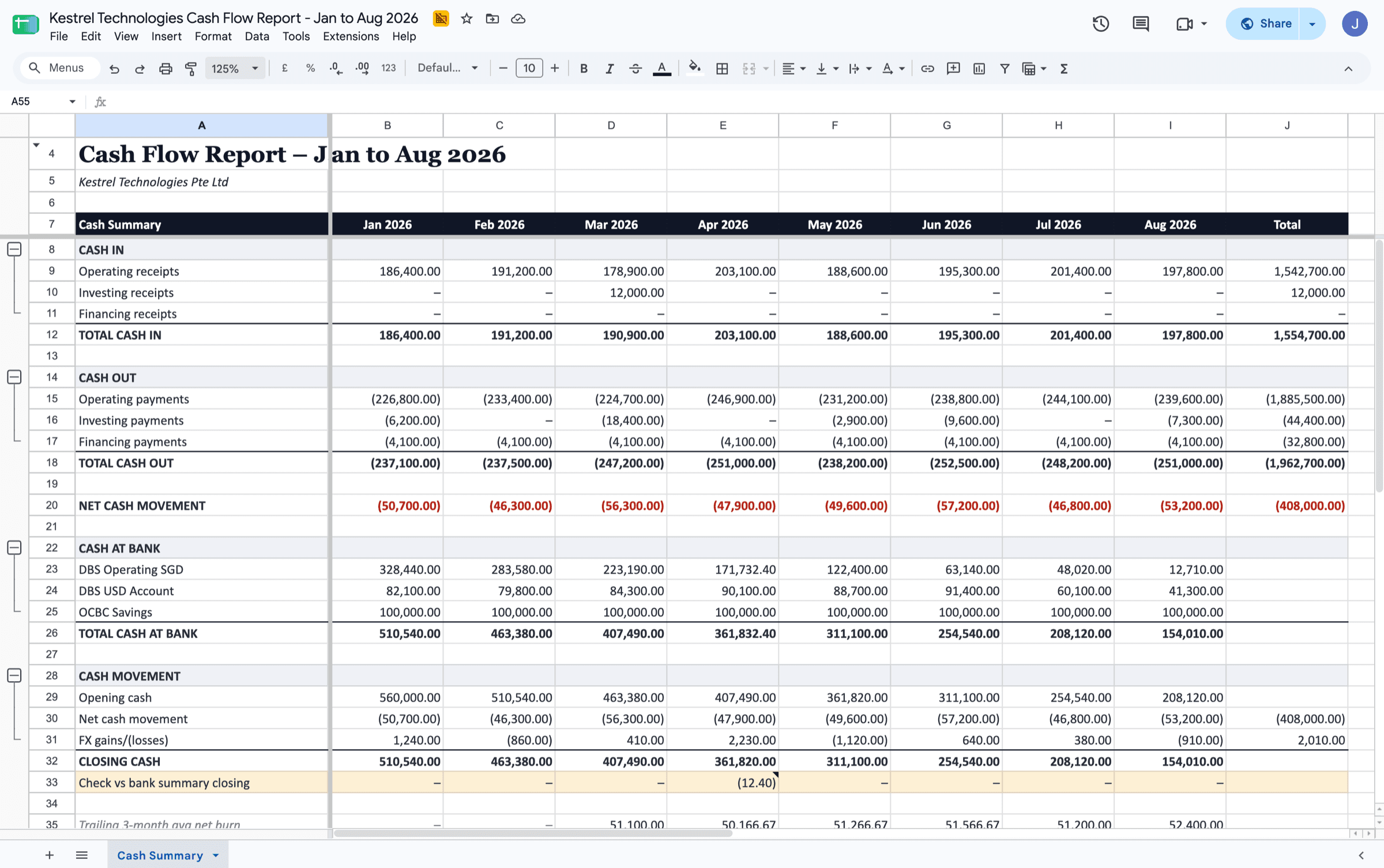
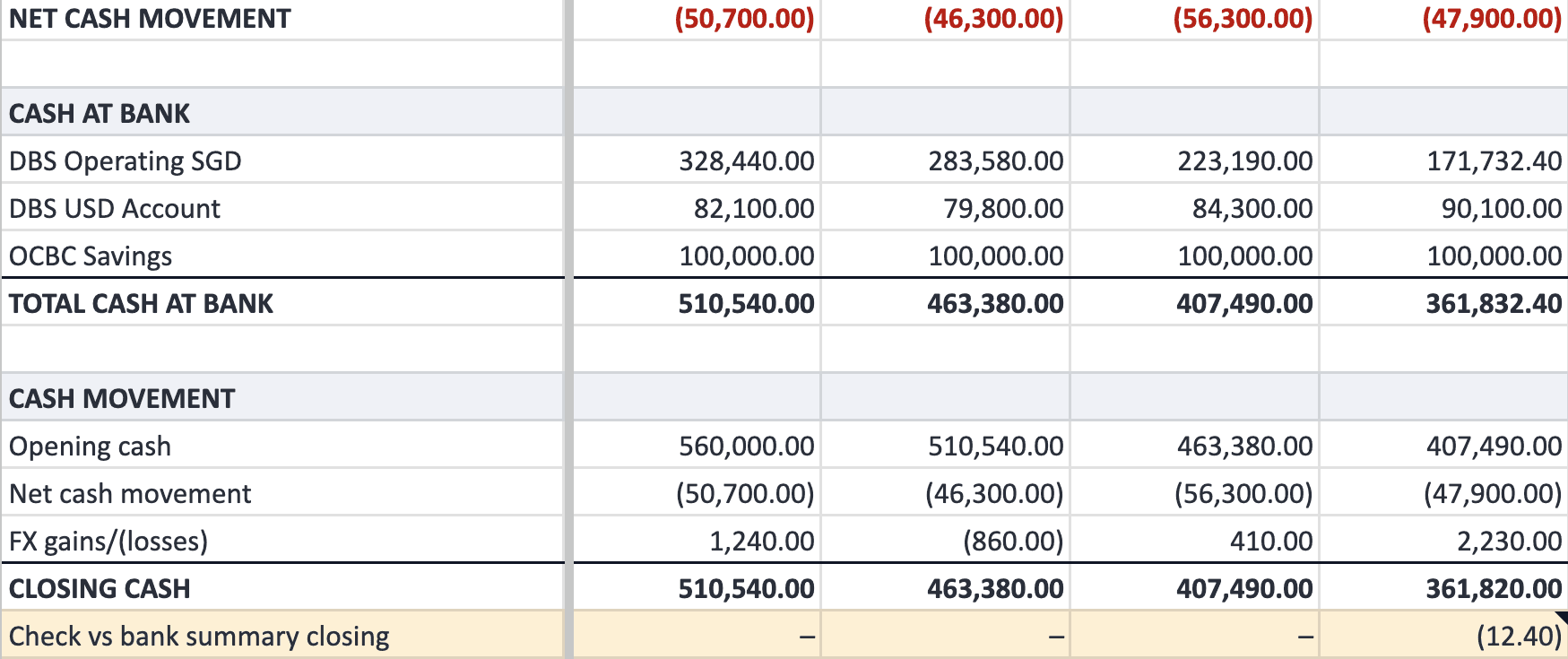
Every receipt and payment is bucketed into operating, investing or financing by the account it's coded to. Transfers between your own accounts are dropped, and opening cash, FX and month-end balances come from Xero's Bank Summary.
A check row under every month shows the gap to the bank, so it stays visible rather than plugged.
See in demo report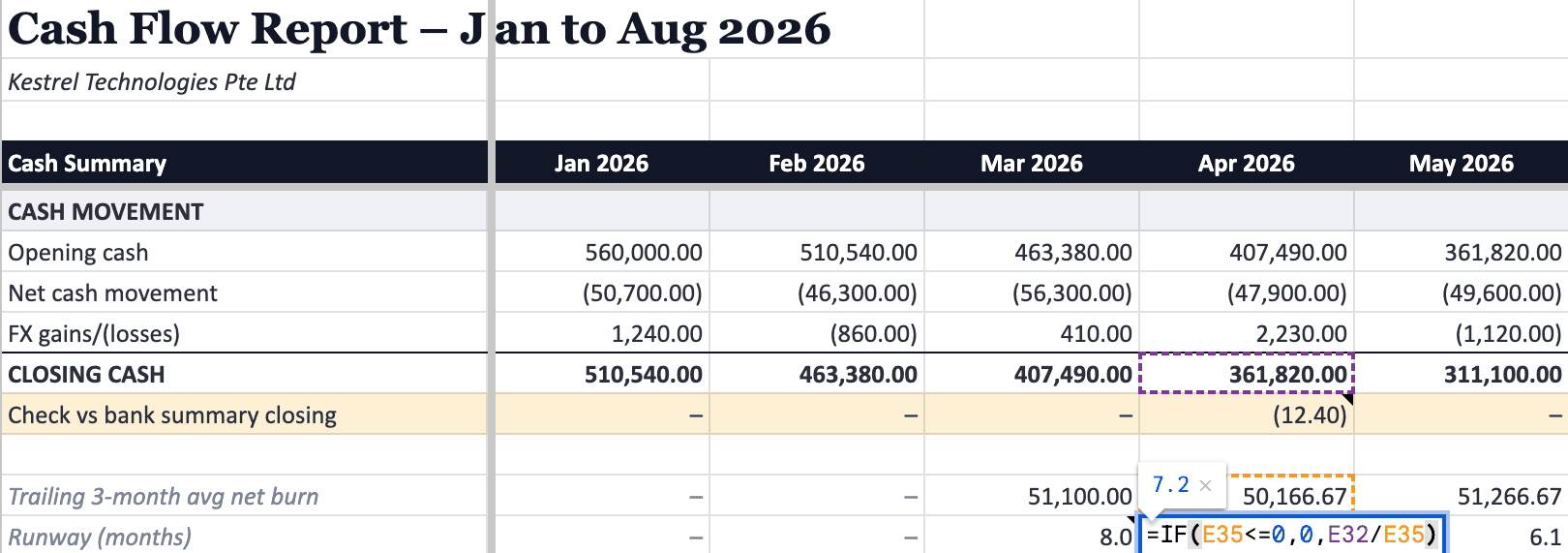
Burn and Runway as Live Formulas
Trailing three-month net burn and months of runway are written as formulas on every month, not typed in. Months without three months of history show a dash rather than a made-up number.
Click the cell, read the formula, trust the number.
See in demo report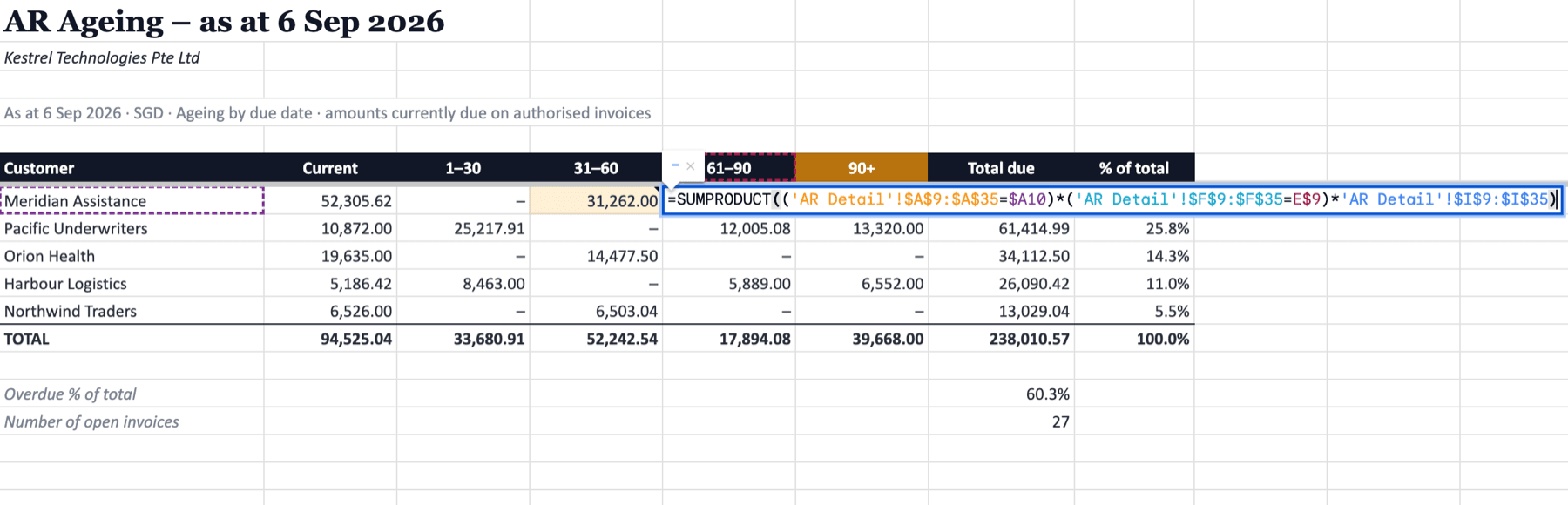
AR / AP Ageing Down to the Invoice
Every open invoice and bill, aged by days past due: Current, 1–30, 31–60, 61–90 and 90+. Each per-customer total is a formula over a detail tab that lists the invoices behind it, with days overdue on every row.
Sort the detail by days overdue and you have the collections list.
See in demo report02Cash Flow Statement
The indirect-method statement Xero doesn't produce: profit bridged to cash.
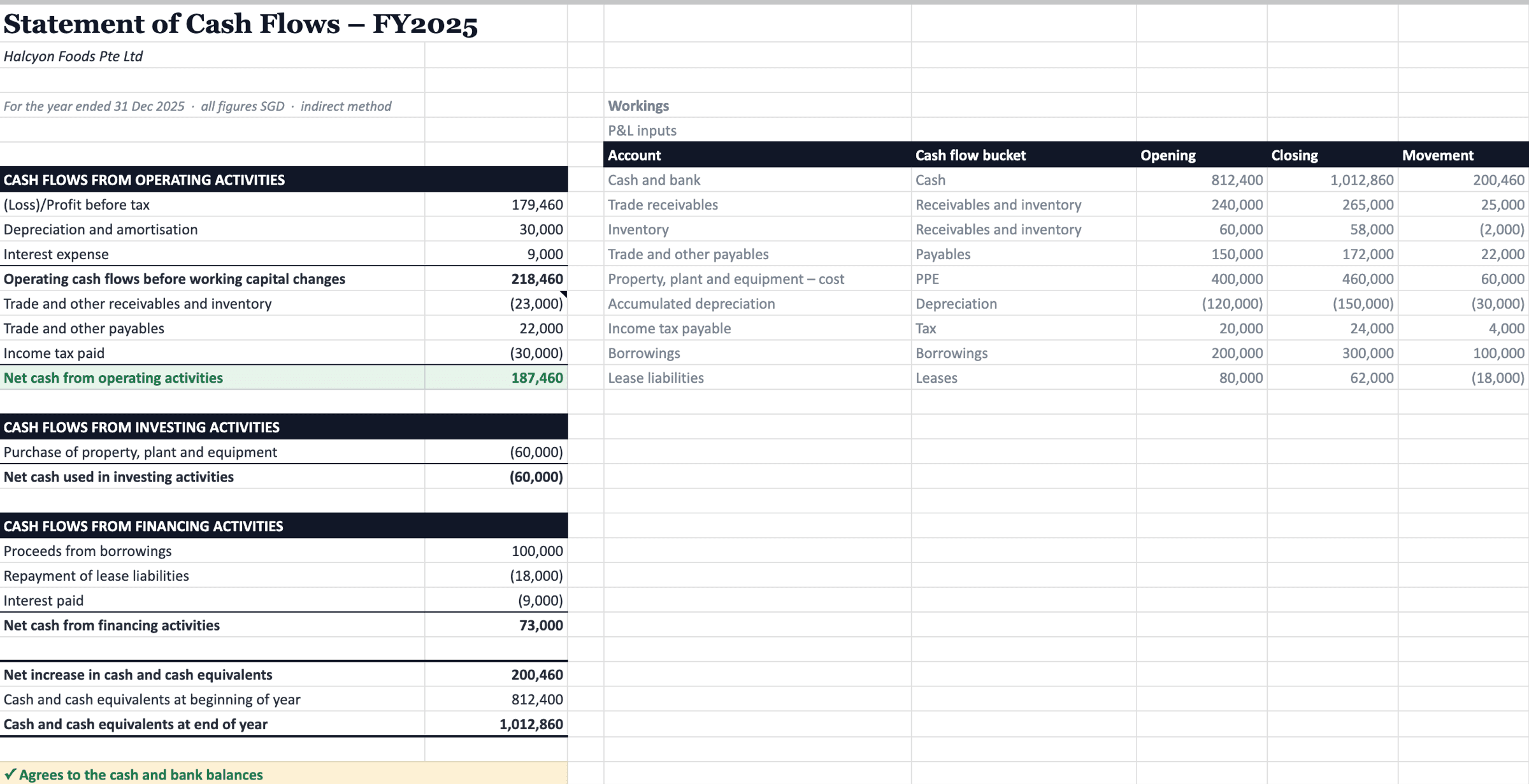
Profit to Cash, Line by Line
Profit before tax, add-backs, working-capital movements, tax paid, capex and financing, laid out the way boards and lenders read it. Each line is a formula over the balance sheet movements, with the workings beside it.
A check at the foot confirms closing cash agrees to the bank balances. Built for a single entity or a consolidated group.
See in demo report03Cash Flow Forecast
What's due in and due out, from the dates already on your invoices and bills.
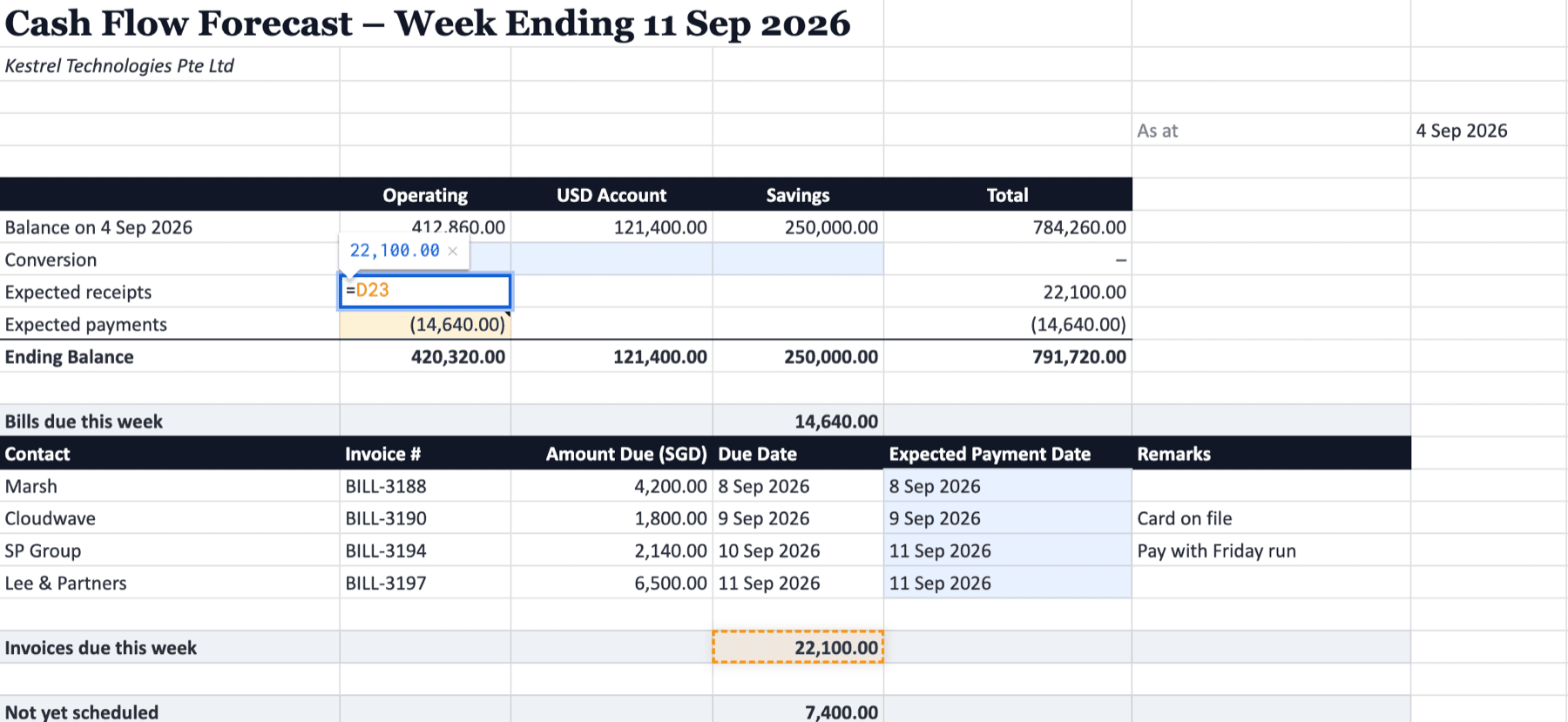
Next Week's Cash, From Due Dates
Open bills and invoices are cut by due date into expected payments and expected receipts for the week ahead, beneath a balance grid per bank account. What was paid this week sits alongside, cut on the actual paid date.
Expected dates, FX conversions and remarks are input cells you own, so the forecast carries your judgement, not just Xero's dates.
See in demo reportManual Excel Cash Reporting vs. Cheetah
Month-end and Friday afternoon, with and without Cheetah.
Manual Excel cash pack
- Categorise the bank movement by hand, then plug the gap to the bank
- Recompute burn and runway in a side cell nobody quite trusts
- Rebuild the profit-to-cash bridge from two balance sheets and a P&L
- Re-sort a year of exports every Friday to see what's paid, due and unscheduled
Cheetah
- Categorised by rule, with a check row that shows the gap under every month
- Trailing three-month burn and runway as live formulas
- Indirect-method statement as formulas over the balance sheet, agreed to closing cash
- Open bills and invoices cut by due date into next week's expected payments and receipts
From Excel Pack to Cash Reports on Demand
Scoped in a free consultation, systemised once, generated on demand.
We learn how you read cash: which accounts count as cash, what sits in financing, which day your week ends.
We turn that into rules connected to your Xero org, with a check against Xero's own figures on every run.
Pick the months or the week and hit Generate. The workbook is rebuilt fresh in Google Sheets; change a rule and the next run picks it up.
Trusted by Industry Veterans
Hear what industry veterans have to say.
“Cheetah has become our quiet competitive edge. Reports that used to eat up half our month-end now land in minutes. The team now spends their hours on advisory work instead of cleaning up spreadsheets.”

“Consolidated reporting used to take hours of manual prep. With Cheetah, it's one click — structured exactly how each client wants it. We've gone from preparing reports to actually advising on them.”

“We never thought our complicated business logic could be built into a systemised report until Cheetah delivered it. Whenever we need changes made, we get the responsiveness of a dedicated analyst.”

Cash Flow FAQ
Common questions about cash flow reporting from Xero with Cheetah.
Does Xero report cash flow natively?
Partly. Xero has a Bank Summary, a direct-method Statement of Cash Flows that is often advisor-only, and a Short-Term Cash Flow that looks 7 or 30 days ahead. None of them let you define the operating, investing and financing split for your own accounts, show burn and runway, or produce the indirect-method statement boards expect.
What's the difference between the report, the statement and the forecast?
The report looks back at cash that has moved: in and out by month, burn, runway and ageing. The statement bridges profit to cash using the indirect method, the format boards and lenders read. The forecast looks ahead using the due dates already on your open invoices and bills. They answer different questions, so you can take one or all three.
How does Cheetah build the cash flow report?
From the source, not from Xero's reports. Bank transactions and invoice or bill payments are pulled for the period and categorised line by line. Transfers between your own accounts are excluded, refunds go the right way, and opening cash, FX and month-end balances come from Xero's Bank Summary. The standard split follows Xero account types; a mapping specific to your chart of accounts lives in a reference sheet you own.
What does it reconcile to?
Xero's own figures. The report carries a check row against the Bank Summary closing balance for every month, and the statement checks that closing cash agrees to the bank balances. Small gaps do happen, usually from transfers or bank fees netted off a payout, and they are shown on the sheet rather than plugged.
How far ahead does the forecast look?
The standard forecast covers the week ahead, built from the due dates on open invoices and bills, with input cells for expected payment dates, FX and remarks. A longer horizon, recurring commitments or scenarios are scoped in consultation. Unlike a forecasting app, it lands in a spreadsheet you can audit formula by formula.
Does it work across multiple entities or clients?
The report and forecast run one Xero org at a time, so an accounting firm can run the same report against every client's org. The statement has been built for a consolidated group as well as a single entity.
How long does setup take?
The standard cash flow report and AR/AP ageing run on any connected Xero org straight away. A bespoke forecast or statement is scoped in a free consultation, then tested against your own prior workings before you rely on it.
Where does the data live?
In Google Sheets. Every run pulls fresh from Xero and writes a new workbook; Cheetah stores your Xero connection and report settings, not your transactions. The standard reports open cleanly in Excel.
