For multi-entity groups
Xero Reporting
for Multi-Entity Groups
One month-end across every Xero organisation, built around how your group actually reports.
- Consolidated group reports
- Board-ready management packs
- Group cash across every entity

What Your Group Can Do With Cheetah
Close the month across every entity, then keep sight of the whole group between closes.
Close the group month
One month-end, every Xero organisation
Each entity keeps its own Xero organisation and its own chart of accounts.
Cheetah pulls them into one set of reports, built to how your group closes.
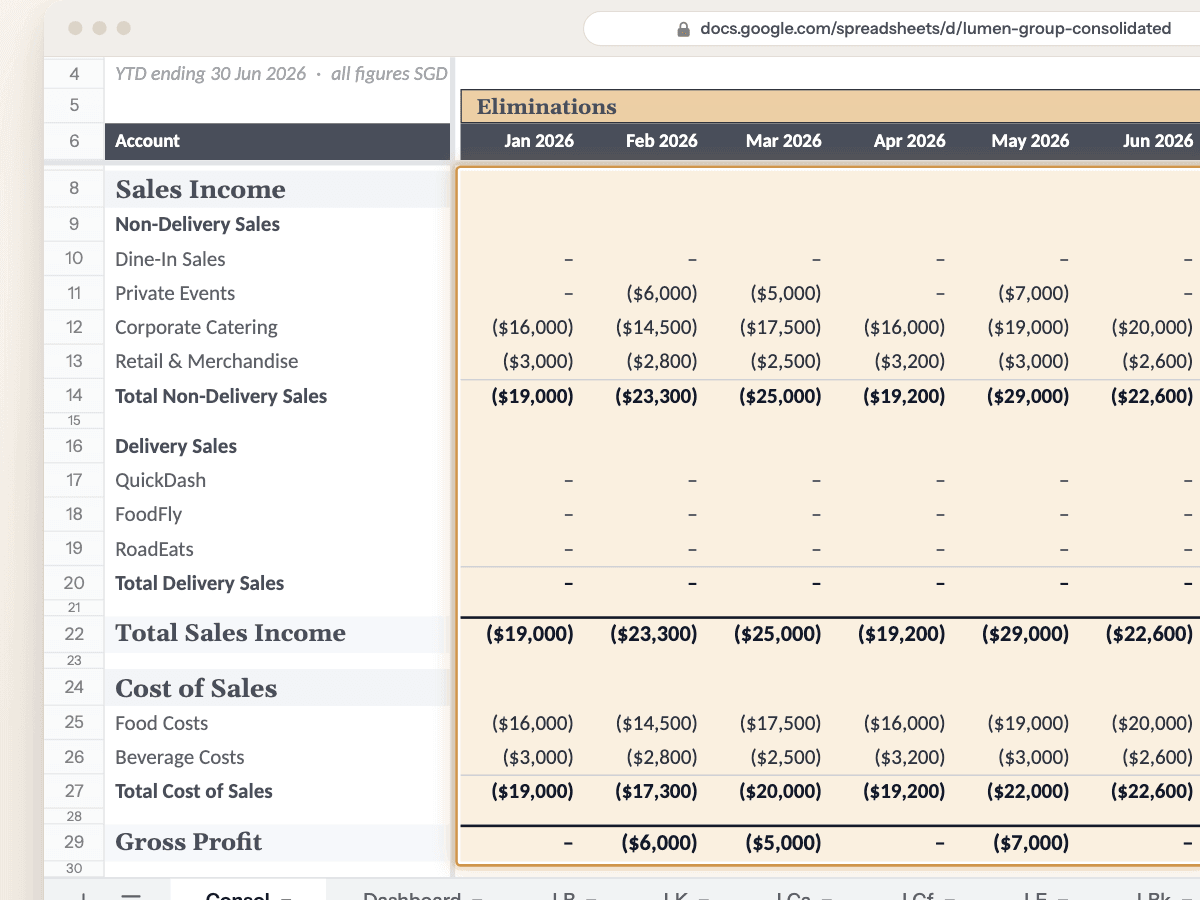
Consolidated reports
Profit & loss and balance sheet across every entity, with intercompany eliminated and foreign currencies translated at your group's rates.
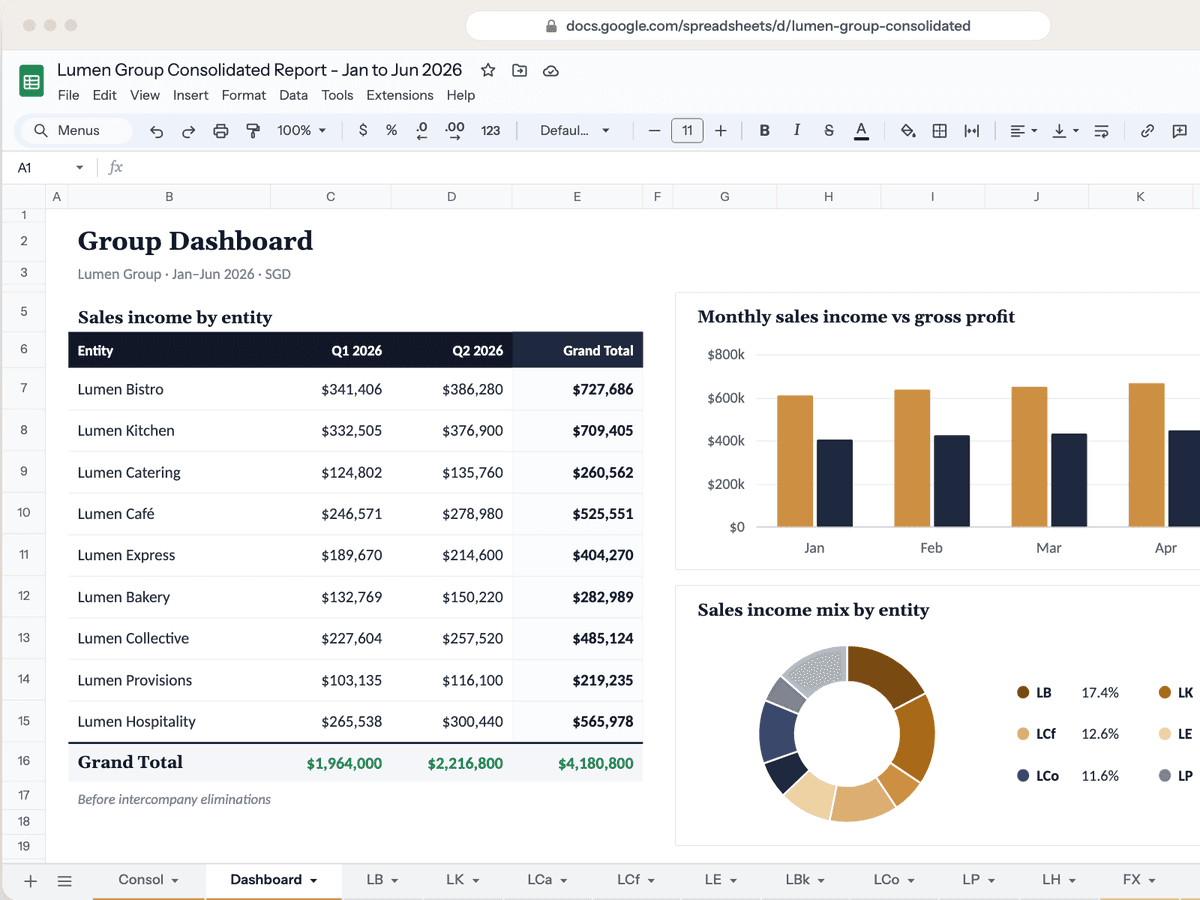
Management and board packs
Each entity's results side by side, with the pivots and charts your board reads, in your group's layout. One click each month.
See across the group
Every entity, seen clearly
Between closes, the questions keep coming.
See the group's cash in one place, how each entity really performs, and ask questions that span every organisation.
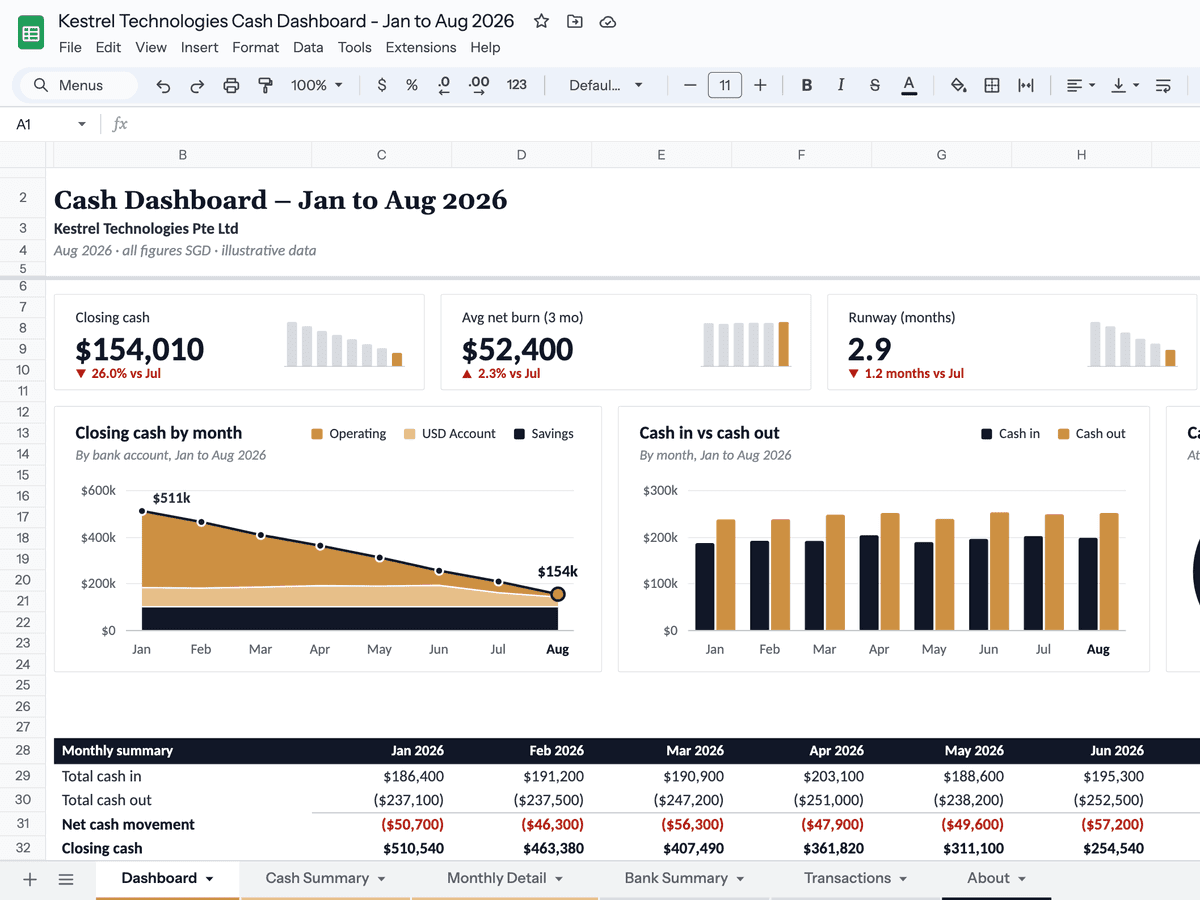
Group cash
Cash across every entity and bank account: where it went, what's coming in and how long it lasts. Checked against the bank every month.
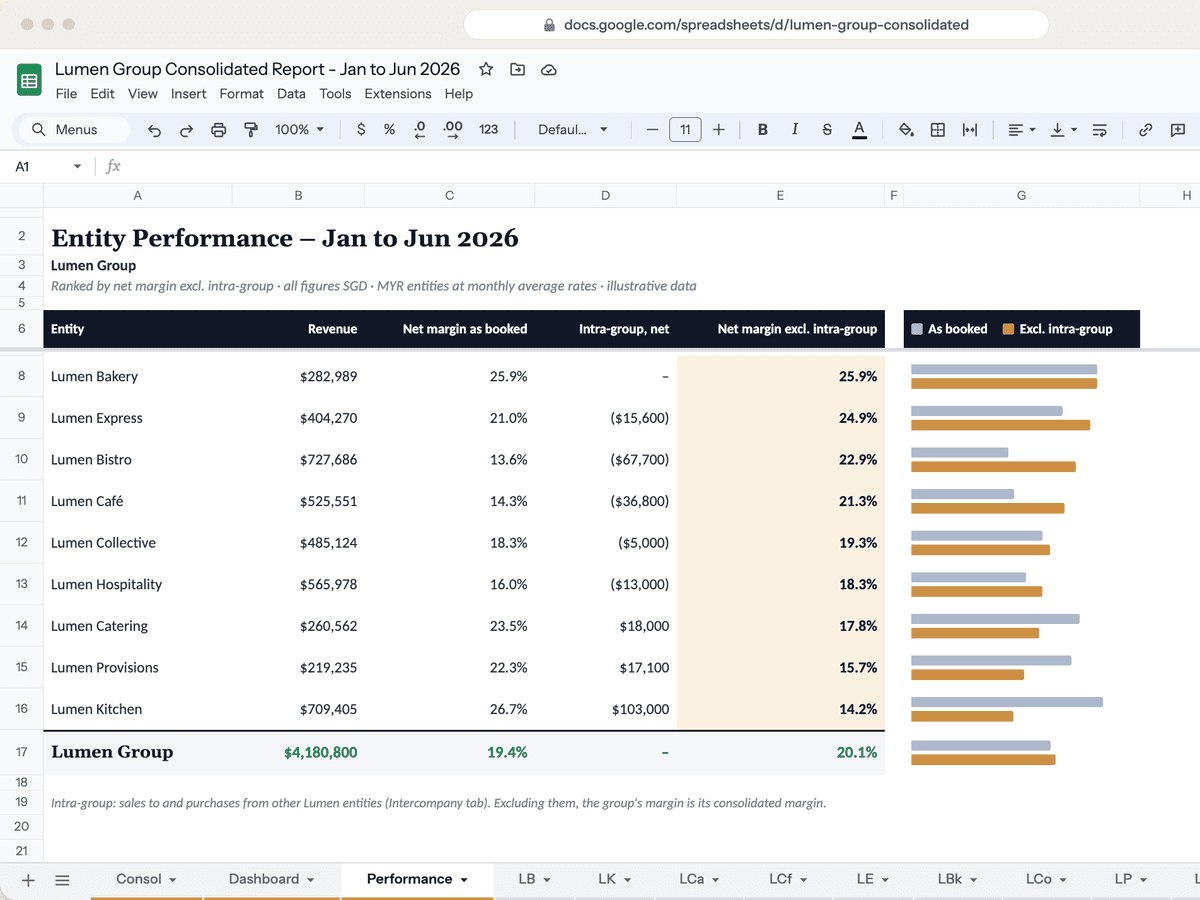
Intra-group performance
Each entity ranked on revenue and margin, as booked and with intra-group trades taken out, so recharges and management fees don't flatter one entity at another's expense.
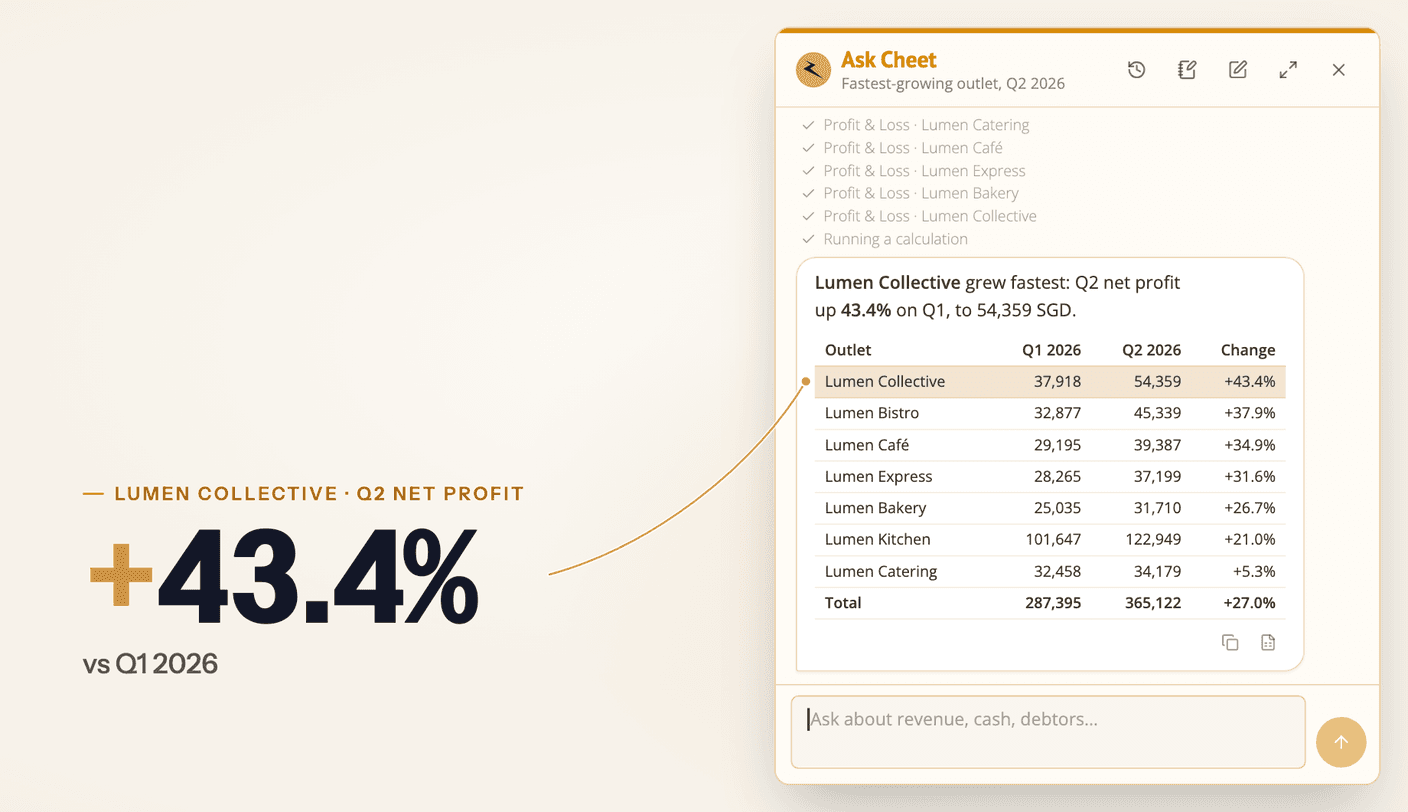
Ask Cheet (beta)
Ask about one organisation or all of them at once: which entity grew fastest, who owes the group the most. Answers come back as tables and charts.
From Your Month-End to One Click
You show us how the group reports. We build it. Your team runs it.
Walk us through the reports you build today: the entities, the eliminations and the layout your board reads. The first call is free.
We build the reports around your group's rules and check the first outputs against a month you've already closed.
Pick a period and hit Generate. When the group adds a company, we add it to the reports.
The pack lands in Google Sheets with live formulas you can trace, ready to export to Excel or PDF.
What's Included
Everything in the finance teams plan.
Unlimited reports and users
Every report the group needs, for everyone on the team. No per-seat pricing.
Every entity connected
Each Xero organisation connects once. Different charts of accounts map to one group structure.
Your group's layout
Your eliminations, your currency rules and the layout your board reads. No templates.
Read-only Xero access
Cheetah only reads from Xero and never changes your books. Figures are pulled fresh on every run.
Live formulas you can trace
Every number in the sheet is a formula back to its source, not a pasted value.
Ongoing support and fixes
You work directly with the person who builds your reports. When the group changes, the reports do too.
What Clients Say
Groups and the firms that report for them, on working across entities with Cheetah.
“The platform is straightforward to use, and the Cheetah team has also been very responsive whenever we need assistance or adjustments to our reports. We mainly use Cheetah for our consolidation work, and it has made the process of consolidating financial data across multiple entities much more efficient and manageable.”
“We never thought our complicated business logic could be built into a systemised report until Cheetah delivered it. Whenever we need changes made, we get the responsiveness of a dedicated analyst.”

“We use Cheetah to handle our custom Xero reports, especially for clients with multiple operating entities that require heavy consolidation. What previously took 4+ hours of tedious work in spreadsheets is now fully automated and ready in seconds.”
“Consolidated reporting used to take hours of manual prep. With Cheetah, it's one click — structured exactly how each client wants it. We've gone from preparing reports to actually advising on them.”

Multi-Entity Groups FAQ
Common questions from group finance teams about Cheetah.
Do we need a full consolidation?
Not always. Some groups only need each entity's results side by side, with no eliminations. Others need a full consolidation, with intercompany balances eliminated and foreign currency entities translated. We build whichever your group reports, or both from the same Xero data.
Doesn't Xero report across organisations already?
Not on standard plans. Xero's own reports, including Xero Analytics, don't combine organisations. The new Xero Ultra plan (Australia only so far) includes consolidation. Our guide to multi-entity Xero reporting covers what you can do in Xero itself.
Our entities use different charts of accounts. Is that a problem?
No. Each entity's accounts map to the group's structure in a Google Sheet your team can edit, so a new or renamed account is a change to the mapping, not to the report.
Can it handle entities in different currencies?
Yes. Foreign currency entities are translated at the rates your group uses, such as the monthly average or the closing rate, the same way every month.
How long does setup take?
Most groups are live in about a week, depending on how many entities you have and how the group reports. After that, each month-end is one click.
How is Cheetah priced for groups?
A one-off setup per report, then a monthly plan with unlimited reports and users, plus a fee for each additional entity. The details are on the pricing page. Every plan includes a 30-day free trial with no card required, and you pay only after we deliver a report you're satisfied with.
Where does our data end up?
In Google Sheets, exportable to Excel, PDF or CSV. Cheetah holds your Xero connections and the group's mapping, and pulls the figures fresh from Xero on every run.
