

Trusted by Modern Finance Professionals










Why Profitability Is Painful in Xero
Two tracking categories, one P&L per org. Everything else lives in a spreadsheet rebuilt every month.
Xero only slices two ways
Xero segments only by tracking category, and you get two. Each has to exist before the transactions are coded, so a cut you didn't set up early can't be rebuilt from history.
Shared costs land in one bucket
Rent, payroll and software are billed once and used by every location. Until someone splits them, whichever branch the bill was coded to looks like the worst performer.
Earn-spend mismatch
Revenue and cost for any given item may land in different months. A project invoiced in March and delivered in April shows a great March and a terrible April.
Built Around Your Margin Logic
Whatever you measure profit by, Cheetah can slice by it. Allocated and tied out your way, on every run.

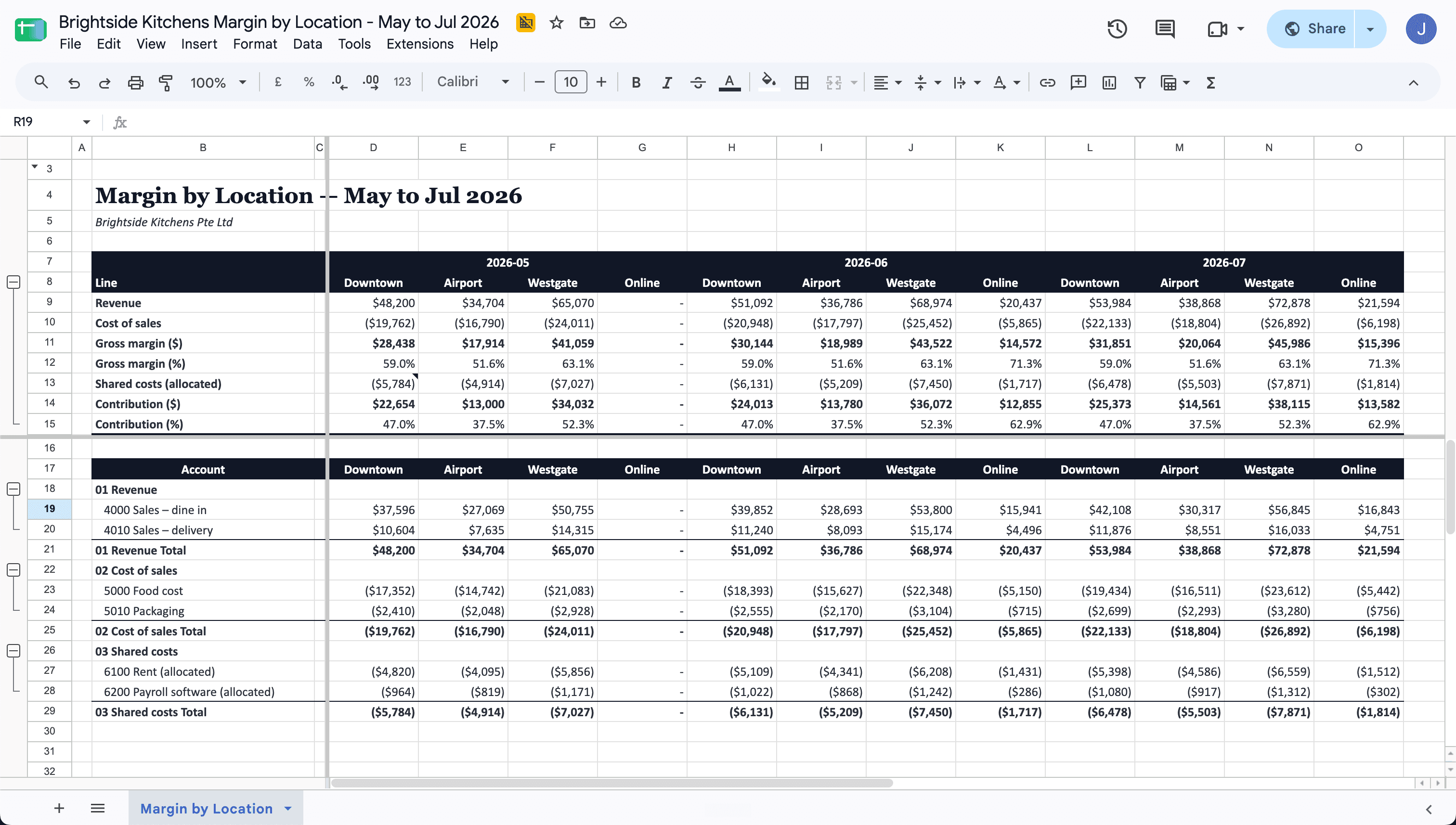
Profit by the Segment You Manage
Location, product line, project or customer: Cheetah reads the identifier from wherever it sits in Xero, whether a tracking category, a contact or a code in the invoice reference, and maps it through a reference sheet you own. Anything it can't place is listed as Unmatched rather than dropped.
Costs follow the customer or project they were incurred for, so a customer's margin includes the bills, not just the sales.
Revenue in the Month It Was Earned
An invoice date isn't a delivery date. Your timing rule, such as a service month tagged on the invoice or journal, moves revenue into the month it was earned, and matched accrual and reversal pairs are netted out.
The same rule every month, so margin stops moving for no reason.

Drilldown to Transactions
A built-in pivot table lets you drilldown into any subtotal, so the transactions moving the needle are a double-click away: every invoice, bill, credit note, journal and bank line for the period.
When a number looks wrong, you find the document, not the preparer.
Shared Costs Split by Your Rule
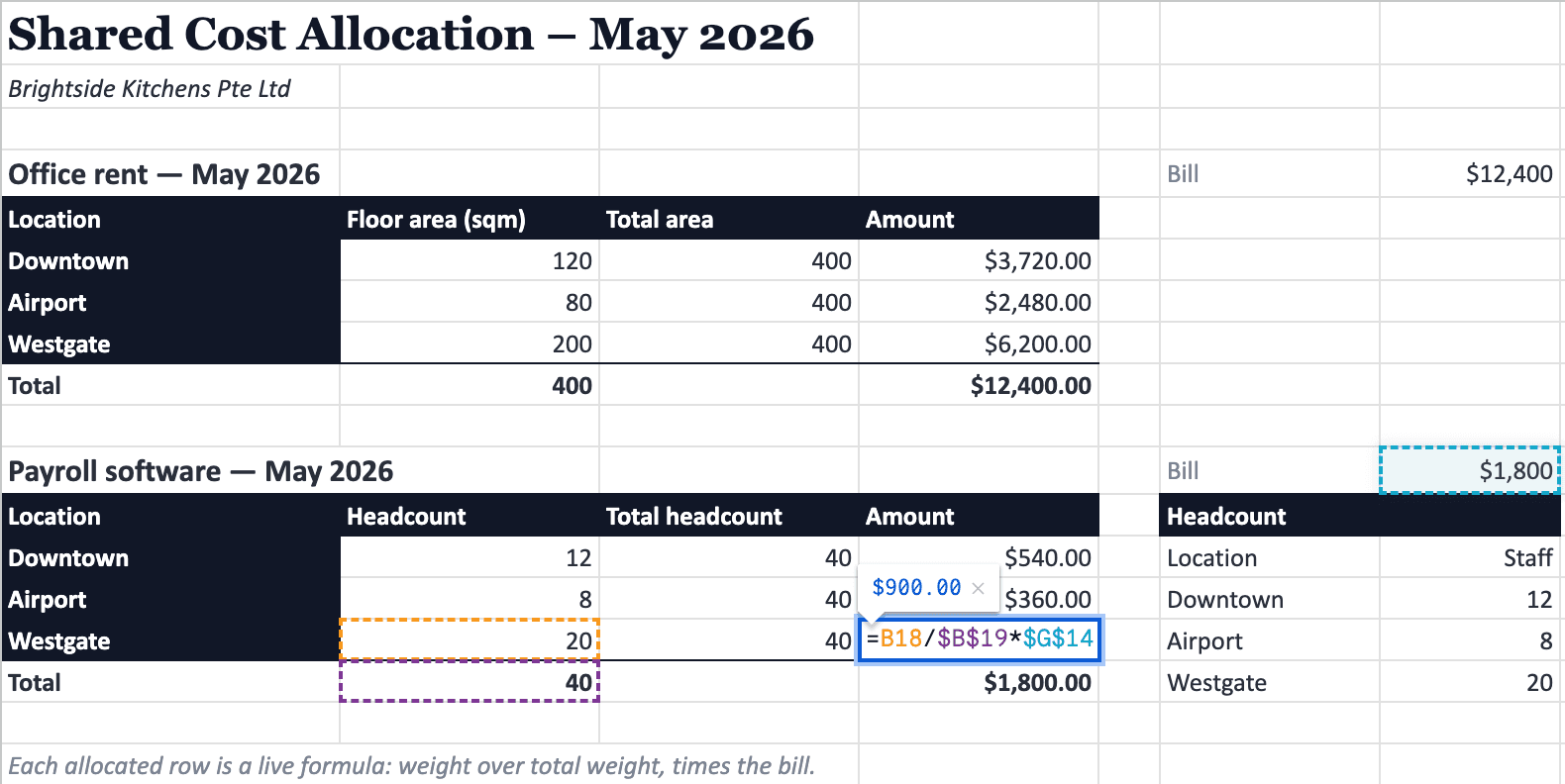
Rent by floor area, payroll by headcount, software by user count: whatever your rule is, it's applied the same way every month. Where a weight table drives the split, each allocated row is a live formula: weight over total weight, times the bill.
Weight, denominator and bill, visible in the cell. No side calculation to defend.
In Your Preferred Layout
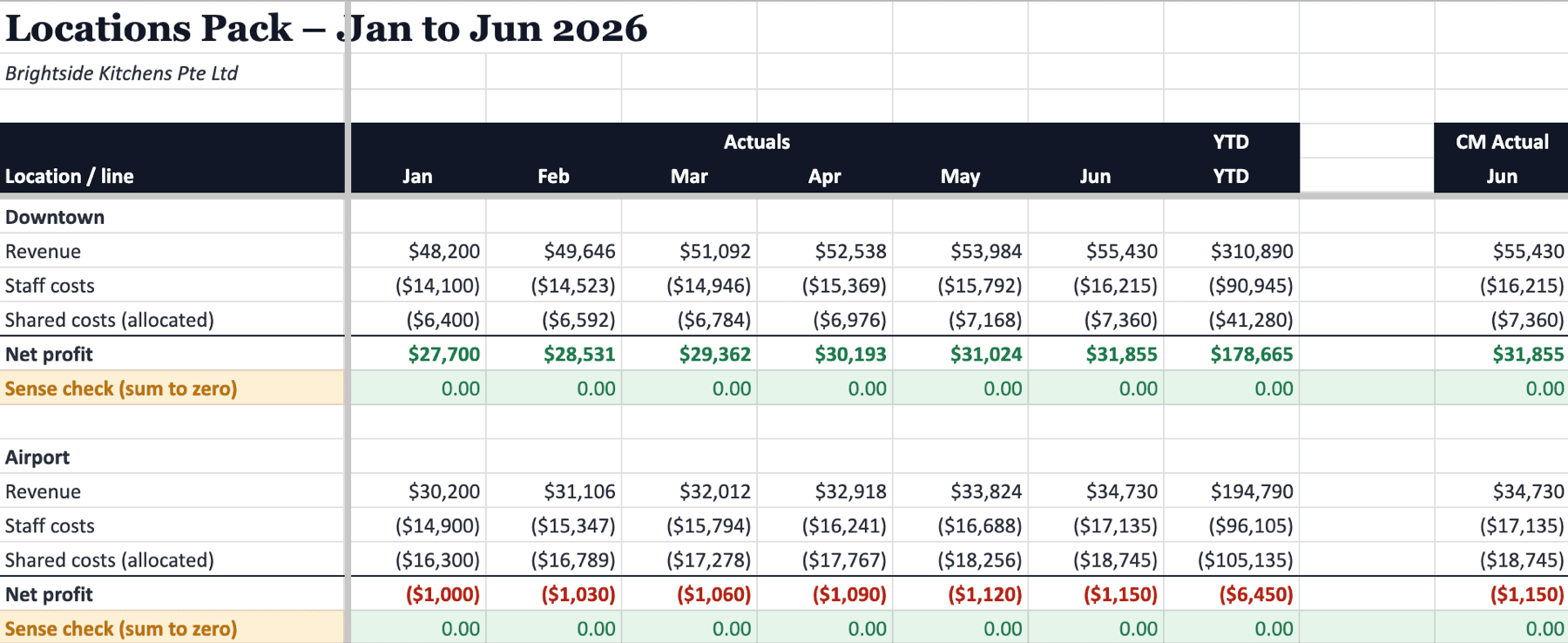
Whether you prefer to see each location in its own P&L across months, or grouped together so you can easily compare them, Cheetah's versatility supports it all.
We believe the best layout is the one that helps you best understand your business, and Cheetah is built for that flexibility.
Manual Excel Margin Schedules vs. Cheetah
The month-end profitability rebuild, with and without Cheetah.
Manual Excel rebuild
- Export invoices, bills, journals and bank lines, one report at a time
- Pick location or project codes out of references by eye
- Split rent and shared costs in a side tab nobody can follow
- Rebuild the pivot every time an account is renamed
Cheetah
- Every document pulled from Xero, down to the line item
- Segments read by rule and mapped with your logic
- Allocations written as live formulas, visible in the cell
- Groupings are live lookups on a mapping tab: re-map, and the pivot re-flows
From Xero Ledger to Margin You Can Defend
Scoped in a consultation, systemised once, generated on demand.
We learn what you measure profit by and how you allocate and tie out today. Your current spreadsheet is the spec.
We build your segments, account map and allocation rules into an engine connected to your Xero orgs, then tie it out against a month you've already closed.
Pick the months and hit Generate. New location or changed weight? Update the reference sheet and run again.
Trusted by Industry Veterans
Don't just take our word for it. Hear what industry veterans have to say.
“Cheetah has become our quiet competitive edge. Reports that used to eat up half our month-end now land in minutes — perfectly formatted, every time. The team now spends their hours on advisory work instead of cleaning up spreadsheets.”

“Consolidated reporting used to take hours of manual prep. With Cheetah, it's one click away — structured exactly how each client wants it. We've gone from preparing reports to actually advising on them.”

“We never thought our complicated business logic could be systematized – until Cheetah delivered it. Whenever we need changes made, we get the responsiveness and ownership of a dedicated analyst.”

Profitability FAQ
Common questions about profitability reporting from Xero with Cheetah.
Does Xero report profitability by location, product or customer natively?
Only as far as its two tracking categories go. Xero can filter a P&L by tracking option, but it can't split a shared bill across locations, move revenue into the month it was earned, or attach a supplier's bill to the customer it was incurred for. Anything beyond that is a spreadsheet, or Cheetah.
How does Cheetah build a profitability report from Xero?
It pulls every invoice, bill, credit note, journal and bank line for the period and rebuilds a line-level ledger in your base currency. Your segment is read by a rule built for your data, accounts are grouped through your mapping sheet, and the result is pivoted into margin by segment in Google Sheets.
What does the report reconcile to?
To the Xero documents themselves. Behind every pivot figure is a transactions tab showing the type, date, account, reference and status of each line. Only authorised, paid and posted documents count, so totals agree to what is booked, not what is drafted.
How do I change the logic?
Account groupings are live lookups on a mapping tab, so re-mapping an account re-flows the pivot without regenerating. Segment hierarchies, allocation weights and timing rules live in a reference sheet you maintain. Structural changes, like a new segment, we build for you.
Does it work across multiple entities or clients?
Yes. One report can span several Xero organisations, including locations that share an org and are split by tracking category. For accounting firms, the method stays the same across clients while each client's mappings live in their own reference sheet.
How is this different from Fathom, Spotlight or Syft?
Off-the-shelf dashboards work on the dimensions Xero already exposes: accounts, tracking categories, contacts. If your margin depends on a shared bill split by headcount, or a supplier's bill following the customer, that logic has to be built. Cheetah builds it, then generates into a Google Sheet where every formula and mapping is inspectable.
How long does setup take?
It depends on how many segments, mappings and allocation rules you have. We scope them in a free consultation, build the engine, then tie it out against a month you've already closed. You'll have a timeline by the end of the consultation.
Where does my data live?
In your Google Sheets. Each run pulls fresh from Xero and writes a new spreadsheet with live formulas and pivots. Cheetah stores your Xero connection and report configuration, not your transactions.
