

Trusted by Modern Finance Professionals










Why Supporting Schedules Eat the Close
Xero holds the ledger. The schedules behind the accounts are still painfully built by hand, per account, per client, per month.
Six schedules, rebuilt for every file
Prepayments, accruals, deposits, other debtors, other creditors, fixed assets. Every period, for every client: Painstakingly pull the ledger, filter the account, work out the release, and rebuild the layout.
Unstructured description fields
Prepayment periods live in an open-ended description field. It can be anything: '02.01 – 06.01.25', 'From 24 Apr 25 to 19 Feb 2026', 'Jul to Aug'. Whoever has the spreadsheet open has to work out the monthly release by eye.
Drift from Balance Sheet
Bills settled through a prepayment or receivables account show the debits but not the clearing credits. Rebuilt from exports, the schedule drifts from the Balance Sheet.
Built Around Your Working Papers
The mechanics a reviewer would check, systemised once. Then generated the same way for every entity, every period.
The Fixed Asset Movement Note
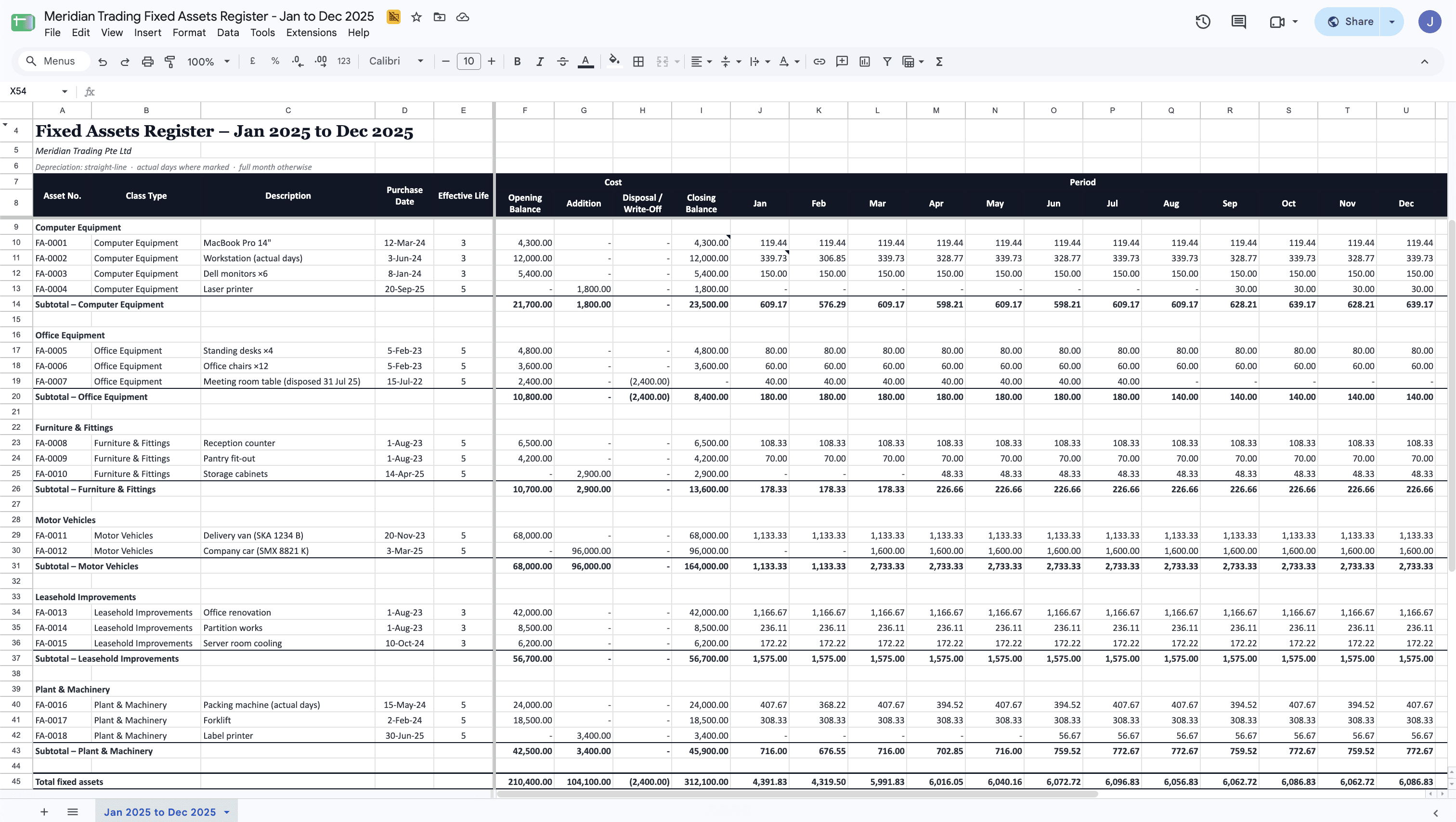
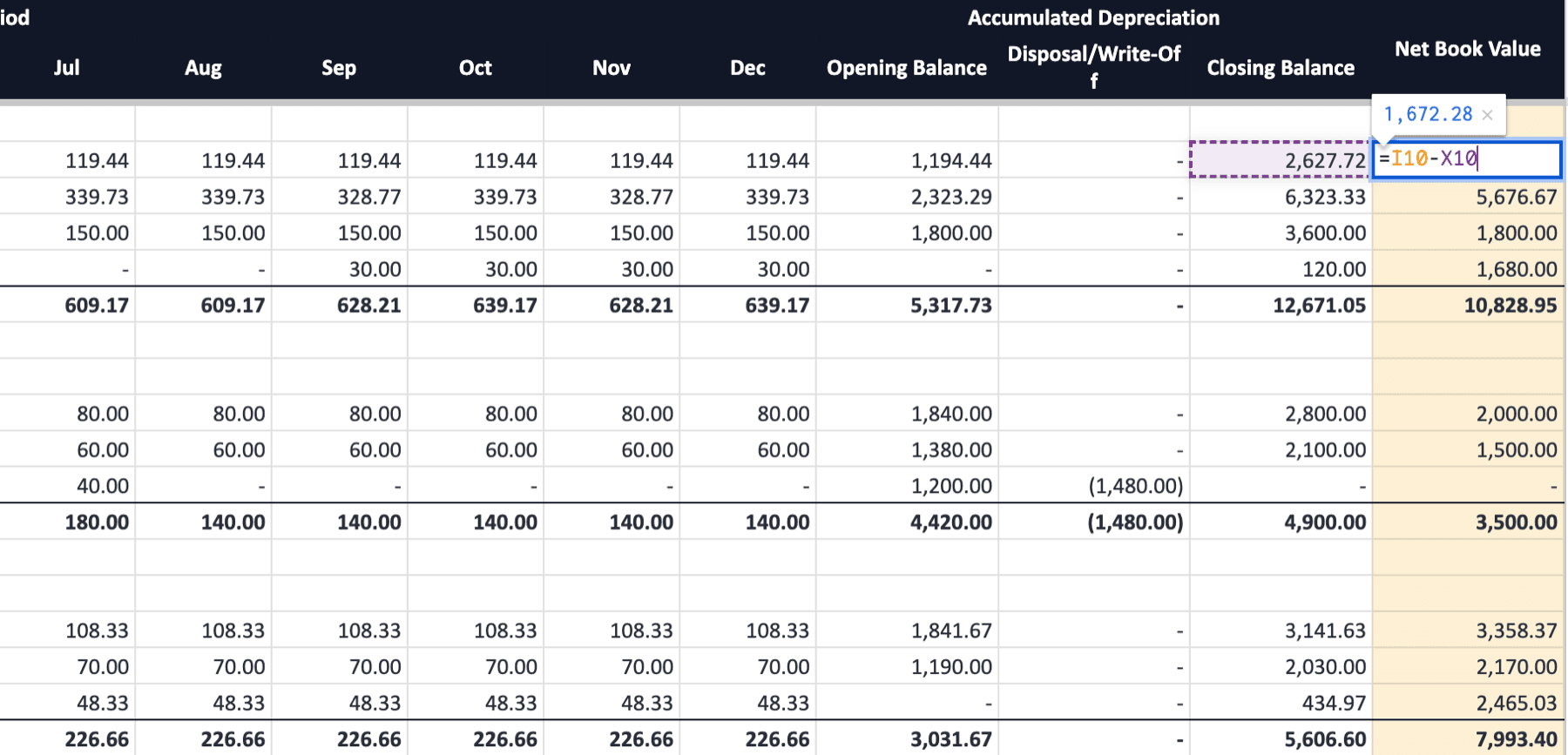
Cheetah reads Xero's Fixed Assets register class by class and lays it out as the movement note: opening cost, additions, disposals, closing; accumulated depreciation and the monthly charges; net book value, with a subtotal per class. Full-month and actual-days assets are charged the way Xero charges them.
Closing balances, subtotals and NBV are live formulas. Click a total and see how it's derived.
See in demo report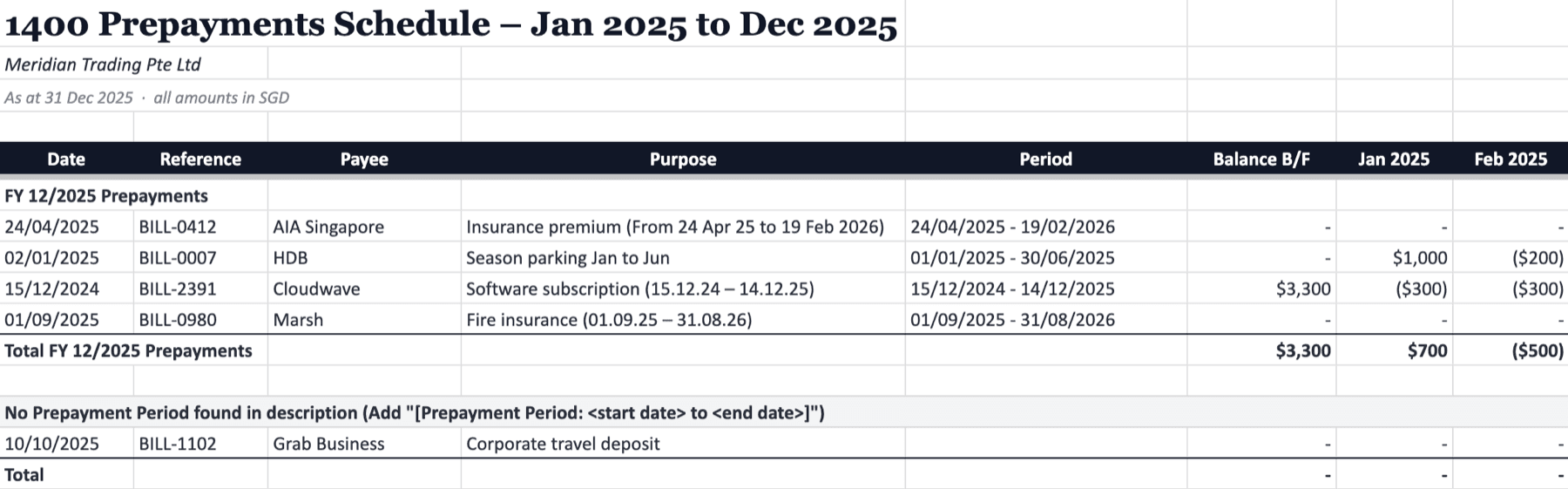
Prepayments Amortised From the Description
The service period is already in the Xero line description, just not in one format. Cheetah reads the common ways it gets typed and releases the cost straight-line over the months it covers. Prepayments from before the financial year are brought forward net of releases already taken.
Anything ambiguous is still listed with actionable recommendations on what exactly to add in Xero.
See in demo report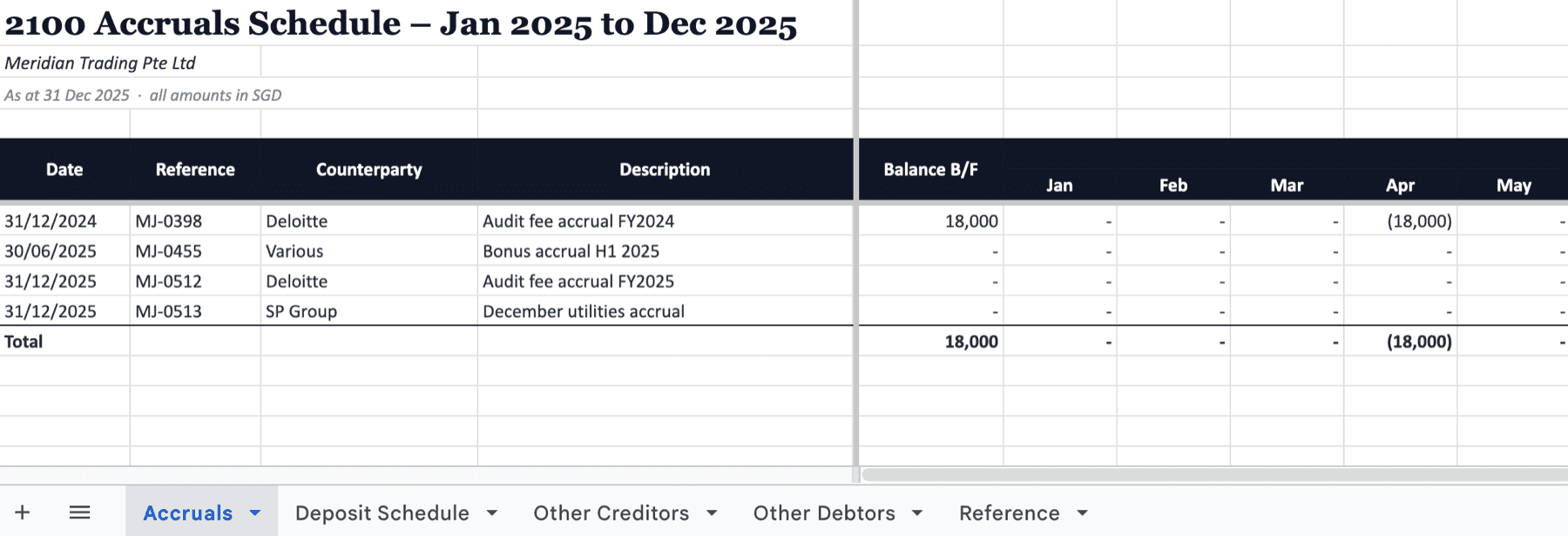
Accruals, Deposits, Other Debtors/Creditors
One recipe: the ledger, filtered to the account codes in your entity's reference sheet, one line per posting. Accruals, other debtors and other creditors land as a movement listing by month with a balance carried forward. Deposits are a running register by the month they were paid.
Every entity gets the same header block, formats and frozen panes, so a reviewer knows where to look before the file opens.
See in demo report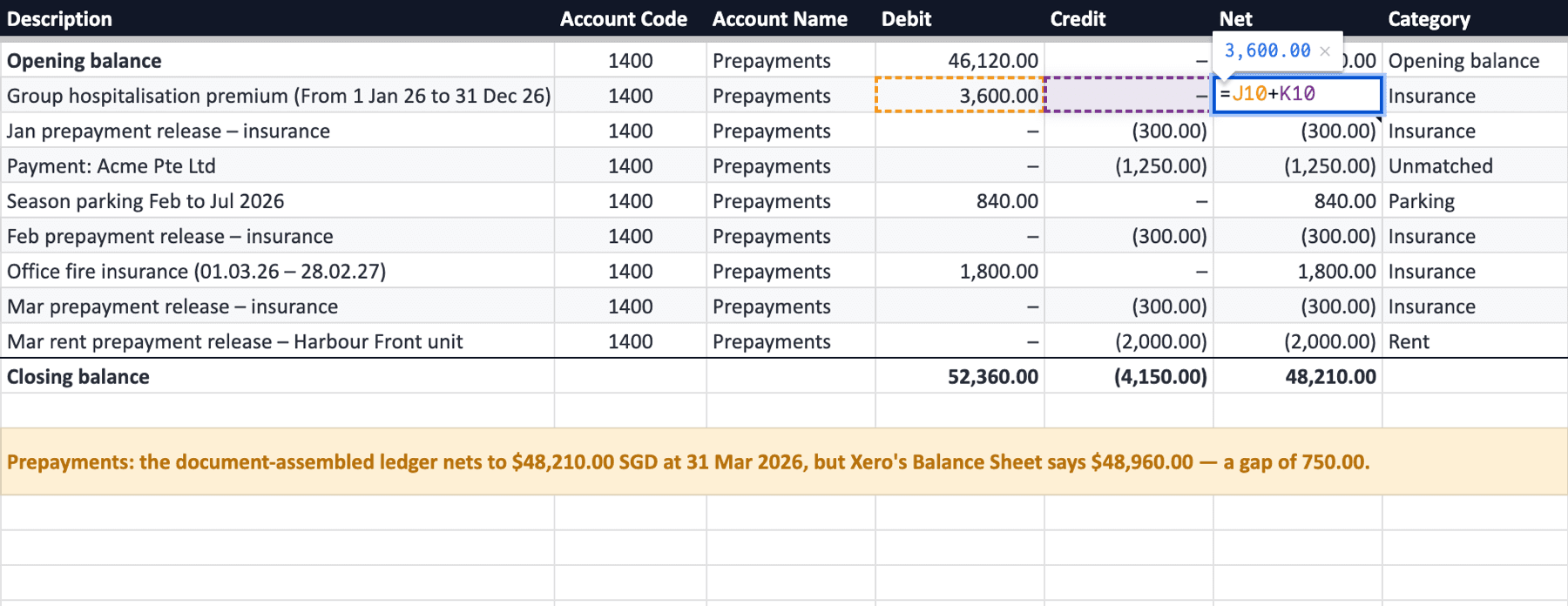
Reconciled to Balance Sheet
For an account that has to tie out, Cheetah opens the ledger with Xero's Balance Sheet balance the day before the period, lists every document line and payment leg, and compares opening plus movements to Xero's closing balance. Lines are categorised from a keyword list your team owns.
A gap is reported with both figures, never plugged.

Schedules That Run on Your Close Calendar
Put any schedule on a monthly run with a rolling rule, whether last month, FY in progress or last completed FY, and it picks the same inputs you would have. Recipients get an email with the Sheet link and an Excel export.
A failed run sends the error rather than skipping quietly.
Manual Excel Schedules vs. Cheetah
A set of working papers, with and without the schedules systemised.
Manual Excel schedules
- Rebuild the layout slightly differently for every client and preparer
- Work out each prepayment's service period from the description by eye
- Retype the fixed asset register into the movement note
- Remember to run it, then email it round before the review
Cheetah
- One layout for every entity, fed by your reference sheet
- Service period read from the description, amortised month by month
- Movement note by asset class, with live closing and NBV formulas
- Runs on your close calendar and emails itself to the reviewer
From Xero Ledger to Working Papers
Three steps, then the schedules run themselves.
We go through your working papers: which Xero accounts feed each schedule, how prepayment periods get described, how your schedules are laid out and how they reconcile with the Balance Sheet.
We build the engine around your logic and format, with a reference sheet of account codes per entity and your headers, totals and formats, connected to each Xero org.
Pick the year and hit Generate, or let the monthly run do it for you. New client? Same engine, same logic, different data.
Trusted by Industry Veterans
Don't just take our word for it. Hear what industry veterans have to say.
“Cheetah has become our quiet competitive edge. Reports that used to eat up half our month-end now land in minutes — perfectly formatted, every time. The team now spends their hours on advisory work instead of cleaning up spreadsheets.”

“Consolidated reporting used to take hours of manual prep. With Cheetah, it's one click away — structured exactly how each client wants it. We've gone from preparing reports to actually advising on them.”

“We never thought our complicated business logic could be systematized – until Cheetah delivered it. Whenever we need changes made, we get the responsiveness and ownership of a dedicated analyst.”

Bookkeeping Schedules FAQ
Common questions about bookkeeping schedules from Xero with Cheetah.
Does Xero itself produce bookkeeping schedules natively?
Only in part. Xero holds a fixed asset register and runs the depreciation, but it doesn't present the movement note by class. It has no prepayment amortisation, accruals, deposits or other-debtors schedules; the Account Transactions report is the raw material users have to painstakingly rebuild them from. That's why you need Cheetah.
How does Cheetah build the schedules?
Each run assembles a line-level ledger from Xero, with its necessary metadata, and filters it to the account codes in your entity's reference sheet. The fixed asset schedule reads Xero's register directly. Everything lands in Google Sheets in your layout, with closing balances and totals as live formulas.
How are prepayments amortised?
Cheetah reads the service period from the Xero line description in the common formats, from a '[Prepayment Period: <start> to <end>]' tag, or from whatever logic you specify. The amount is released straight-line over the months the period covers, and prepayments from before the financial year are brought forward net of releases already taken. Anything with no readable period is listed separately with the tag to add in Xero.
What do the schedules reconcile to?
The account ledgers open with Xero's Balance Sheet balance the day before the period and compare opening plus movements to the closing balance; any gap is reported with both figures. The fixed asset schedule reads the register directly, and every closing figure on the other schedules is a formula your reviewer can trace.
How do we change which accounts feed a schedule?
You edit a Google Sheet, not code. Each Xero entity has a reference sheet listing the schedule and account code per row, plus the presentation currency. Add a row and the next run picks it up.
Can we run this across multiple entities or clients?
Yes, that's how accounting firms on Cheetah run it across their client book. Each Xero org has its own reference sheet, and the same engine generates the same practice-wide layout for every client.
How long does setup take?
It depends on the complexity of schedules that sit behind your working papers. We scope the schedules, account codes and conventions in a free consultation, then check each entity's first outputs against your existing working papers.
Where does the data live?
In your Google Sheets, exportable to Excel, PDF or CSV, and emailed to your team when a scheduled run fires. Cheetah holds your Xero connection and reference-sheet configuration; the ledger is pulled from Xero at each run, but it is never stored.
