Ask Cheet: The Fastest Way to Get Answers From Your Xero Data
Because quick questions shouldn't require us to navigate clunky interfaces.
Updated
Your managing director messages you at 4pm: who owes us the most right now, and is it worse than last month?
It's a 30-second question but a 20-minute job. Open Aged Receivables and run it as at today. Run it again as at the end of last month. Export both, line them up in a spreadsheet, work out the change. Then she asks the same thing about the other two companies.
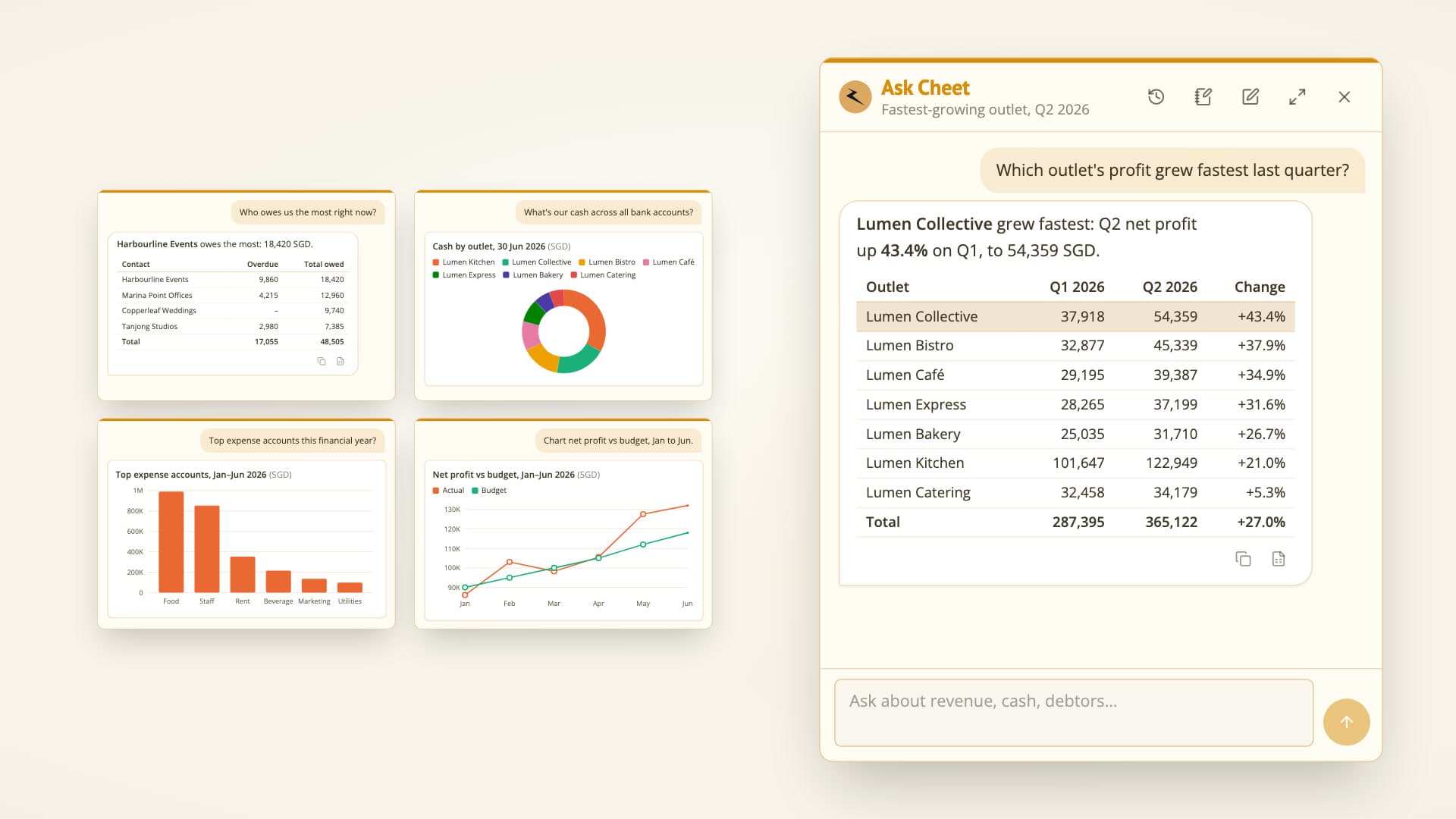
Ask Cheet is our answer to that. It's a chat in the Cheetah app that gets answers from your Xero data in plain English: you ask, it pulls the figures from Xero, does the maths and replies with a table or a chart, usually in under 30 seconds. If you work across several organisations, it's the fastest way we know to get them.
Here's what it does, how we keep its numbers honest, and where it deliberately stops.
Why getting answers from your Xero data takes so long
Xero holds the answer to almost every question a business asks about itself. Getting it out is the slow part.
Every report answers one question. Profit and Loss, Aged Receivables, Bank Summary, Budget Variance. You have to know which report holds the answer, then set the dates, comparison periods and filters before it shows you anything.
The maths happens somewhere else. A margin, a growth rate, an average month or the top ten expense accounts means exporting to Excel and building it there.
One organisation at a time. Xero's own reports, including Xero Analytics, don't combine organisations. Consolidation sits in Syft, the reporting app Xero bought in 2024, and in July 2026 Xero started bundling it into Xero Ultra, a new plan launched in Australia. For everyone else, a question about the group means running the same report once per company.
Xero has been closing part of this gap with its own AI. JAX, its built-in assistant, and its connectors for Claude and ChatGPT all answer questions about your figures in plain English. For a business, each works inside one organisation. That's fine if you run one company, and slow if you look after five. There's a fuller comparison at the end of this post.
What you can ask
Anything about your connected organisations' finances that Xero holds: performance, financial position, cash, receivables and payables, budgets, accounts and transactions. A few examples:
You: Who owes us the most right now?
Cheet: Harbour Logistics, with 48,200.00 SGD outstanding, 31,500.00 of it more than 60 days overdue. Your five largest debtors account for 62% of the 214,900.00 owed to you.
That answer comes from your unpaid sales invoices, aged by due date and grouped by customer, the same way an aged receivables report is built.
- "What was revenue last month, and how does it compare with the month before?" Both months' Profit and Loss, the change, and the lines that moved it.
- "Chart monthly net profit for the last 12 months." A chart, with a table view you can switch to. The table adds the month-on-month change and, where the figures add up, a total.
- "Why did freight costs jump in August?" The transaction lines behind the account: bills, spend money and manual journals, so you can see which supplier or entry caused it.
- "Revenue and net profit for each of our companies in 2025." One table, a row per organisation, subtotals by group, and figures in different currencies kept apart rather than added together. It's the quick version of a question we've written about at length in multi-entity reporting.
Relative dates work the way you mean them. "Last month" counts from today. "This financial year" uses the organisation's own year end. The answer states the exact dates it used, so there's no doubt about what "YTD" meant.
Answers you can take away matter as much as the answer itself. Every table can be copied or downloaded as an Excel file, and every chart can be downloaded as an image, so a figure can go straight into an email or a board slide without retyping. Chats are saved, so you can pick up an earlier conversation where you left off.
The hard part: numbers you can trust
A chat that sounds right is easy to build. One whose numbers are right is the actual product. Four rules do the work.
1. Every figure comes from Xero, fetched for that question. Ask Cheet reads Xero's own reports and transaction lists through read-only tools, the same data your management accounts are built from. It doesn't answer from memory. If the data doesn't answer the question, it says what's missing instead of estimating.
2. Bigger sums run as code. Totals over hundreds of rows, growth rates, margins and averages are calculated by running code, the way you'd reach for a spreadsheet rather than do it in your head. The code runs in a sandbox with no internet and no access to anything else.
3. It names the organisation, period and currency of every figure. This one we learnt the hard way. In testing, we asked for revenue and net profit across 19 organisations. The answer came back with a candid note: it had checked the currency of the three that looked foreign and assumed the other sixteen were in Singapore dollars.
Honest, but an assumption is still an assumption. The report data Xero returns doesn't say which currency it's in, and checking each organisation separately would have meant sixteen more lookups. So now everything Ask Cheet fetches arrives stamped with the organisation's base currency and financial year end. It never has to guess, and it never adds figures in different currencies together.
4. It tells you when the data is partial. If a list is too long to read in full, or an organisation is excluded, the answer says so rather than presenting a partial total as the whole.
It only sees what you can
Your organisations, your login. Ask Cheet can read only the organisations connected to your own Xero login in Cheetah, and it checks that on every request. Not a colleague's connections, and not another client's.
Read-only. It can't create, change or delete anything in Xero. Ask it to raise an invoice and it will tell you it can't.
Some organisations are off limits entirely. Where a client's agreement rules out AI processing, we switch Ask Cheet off for that organisation. It isn't read, and it isn't named.
Not used for training. Ask Cheet runs on Claude through Anthropic's commercial API. Anthropic doesn't train on commercial inputs or outputs, and by default deletes them within 30 days. We haven't opted in to anything that changes that, and Xero's developer terms forbid training AI models on data from its API anyway. We've written more about how Cheetah uses AI and where we draw the line.
Where Ask Cheet stops
It isn't a report. Your board pack, management accounts, statutory accounts and consolidations stay as Cheetah reports: built once around your business logic, reconciled to Xero, and the same every time they run. No model decides what goes in them, and Ask Cheet doesn't change that. It's for the question you have between packs. Ask it the same thing twice and the wording may differ, but the figures come from Xero each time.
Group totals are sums, not consolidations. If you have a Cheetah report for a group, Ask Cheet knows which organisations belong to it and can set their Profit and Loss side by side. The total is a plain sum: intercompany transactions aren't eliminated and nothing is translated. It says so, and points you to the group's consolidated report for the official figures.
Only Xero, and only finance. No market data, no tax advice, no questions about other companies. Ask it for a poem and it will politely suggest a question it can answer instead.
A daily allowance. Each user has a daily allowance, enough for dozens of questions, which resets at 8am Singapore time.
Xero AI, Xero MCP and other ways to ask Xero a question
Ask Cheet isn't the only way to put a plain-English question to Xero, and for some people it isn't the right one. Here are the options, starting with the ones you already have.
1. Run the report yourself
Free, exact, and the right answer for anything you'll ask every month. Slow for a one-off question, and one organisation at a time.
2. Xero AI: JAX
When people talk about Xero AI, they usually mean JAX (Just Ask Xero), which Xero now calls its agentic platform. The chat is built into Xero, available to every subscriber at no extra charge, and still labelled beta. It answers questions like how much you're owed or what you earned over the last six months, with charts and tables. It also does bookkeeping work: matching bank transactions, pulling the details out of receipts and bills, and helping draft invoices, with more agents announced for the coming months, such as chasing missing receipts. Xero's app in ChatGPT runs on JAX too.
For a business, JAX works inside your Xero organisation. Accounting firms get insights across their client base in Xero Partner Hub, also in beta. If you live in one organisation, start here.
3. Xero's connector for Claude or ChatGPT
Xero publishes a free, read-only connector for both: Claude since May 2026, ChatGPT since September. You ask in the chat app you already use. Each connects to one Xero organisation at a time, and a request on Xero's ideas board to connect Claude to several has 81 votes.
4. Paste an export into a general chatbot
Export the report and ask ChatGPT or Claude about it. Quick, but the data is a snapshot, you're choosing what to upload, and unless you ask it to calculate, the model may do the arithmetic in its head. An AI agent with a browser can do the exporting for you across several organisations, as we did for a consolidated report with Claude Cowork, but you're still working from files rather than live data.
5. Xero MCP: Xero's MCP server, or a hosted one
MCP (Model Context Protocol) is an open standard for connecting AI apps to other software's data and tools. Search for "Xero MCP" and you'll find two kinds of thing.
Xero's own MCP server is open source and built for developers. Xero itself describes it as a developer tool for custom workflows and automations, separate from its Claude connector. You run it on your own computer and point an AI app such as Claude Desktop or Cursor at it. Its 50 or so tools read reports, invoices, contacts, bank transactions and payroll, and also create and update invoices, payments, bank transactions and manual journals. It needs a Xero developer account. The recommended setup, a Custom Connection, covers one organisation, costs a monthly fee for each (A$10, £5 or US$5) and is only offered in Australia, New Zealand, the UK and the US.
Hosted MCP servers from other companies skip the setup: you sign in with Xero and add the connector to your AI app. Some, such as Meridian's free connector, can link several organisations to one agent and write to your books as well as read them.
Either way, write access to your books deserves some thought. An AI that can post a manual journal can post the wrong one.
6. Ask Cheet
If you're on Cheetah and work across several organisations, Ask Cheet reads all of them in one conversation, live and read-only, with the checks above. It uses the same Xero connection as your Cheetah reports, so there's nothing to install or set up.
Getting Ask Cheet
Ask Cheet is in closed beta. We're only switching it on for Cheetah users who want it, and it's free during this initial period. Just reach out and we'll turn it on for you. Once it's on, look for the lightning bolt in the bottom-right corner of the Cheetah app, beside the feedback button.
Not on Cheetah yet, and the 20-minute questions sound familiar? Get in touch too.
Frequently asked questions
- What can Ask Cheet answer?
- Questions about the financial data of the Xero organisations you've connected to Cheetah: profit and loss, balance sheet, cash, receivables and payables, budgets, accounts and transactions, plus the calculations and charts built from them.
- Can Ask Cheet change anything in Xero?
- No. It's read-only. It can't create, edit or delete anything in Xero.
- Which organisations can Ask Cheet see?
- Only the organisations connected to your own Xero login in Cheetah, checked on every request. Organisations excluded from Ask Cheet are never read.
- Is my Xero data used to train AI?
- No. Ask Cheet runs on Anthropic's commercial API, and Anthropic doesn't train on commercial inputs or outputs. We haven't opted in to anything that changes that.
- How is Ask Cheet different from Xero AI (JAX)?
- JAX is Xero's own assistant, free to Xero subscribers, and the natural place to start if you work in one organisation. Ask Cheet lives in Cheetah and reads every organisation connected to your Xero login in one conversation, knows the groups your Cheetah reports cover, and lets you copy any table or download it to Excel.
- Is Ask Cheet built on Xero's MCP server?
- No. Ask Cheet reads Xero through Cheetah's own read-only tools, over the same Xero connection your Cheetah reports use, so there's nothing to install and no Custom Connection to pay for. Xero's MCP server is an open-source developer tool you run yourself, and it can write to your books as well as read them.
- Does Ask Cheet replace my Cheetah reports?
- No. Reports stay deterministic: built once, reconciled to Xero and the same every time they run. Ask Cheet is for the quick question between reports.

A finance professional turned product builder, Jarvin has built hundreds of reports by hand and knows what financial and operational reporting demands: customisability, auditability, scalability, and security. Having automated that work reliably, he's now helping advisory firms and finance teams do the same.
