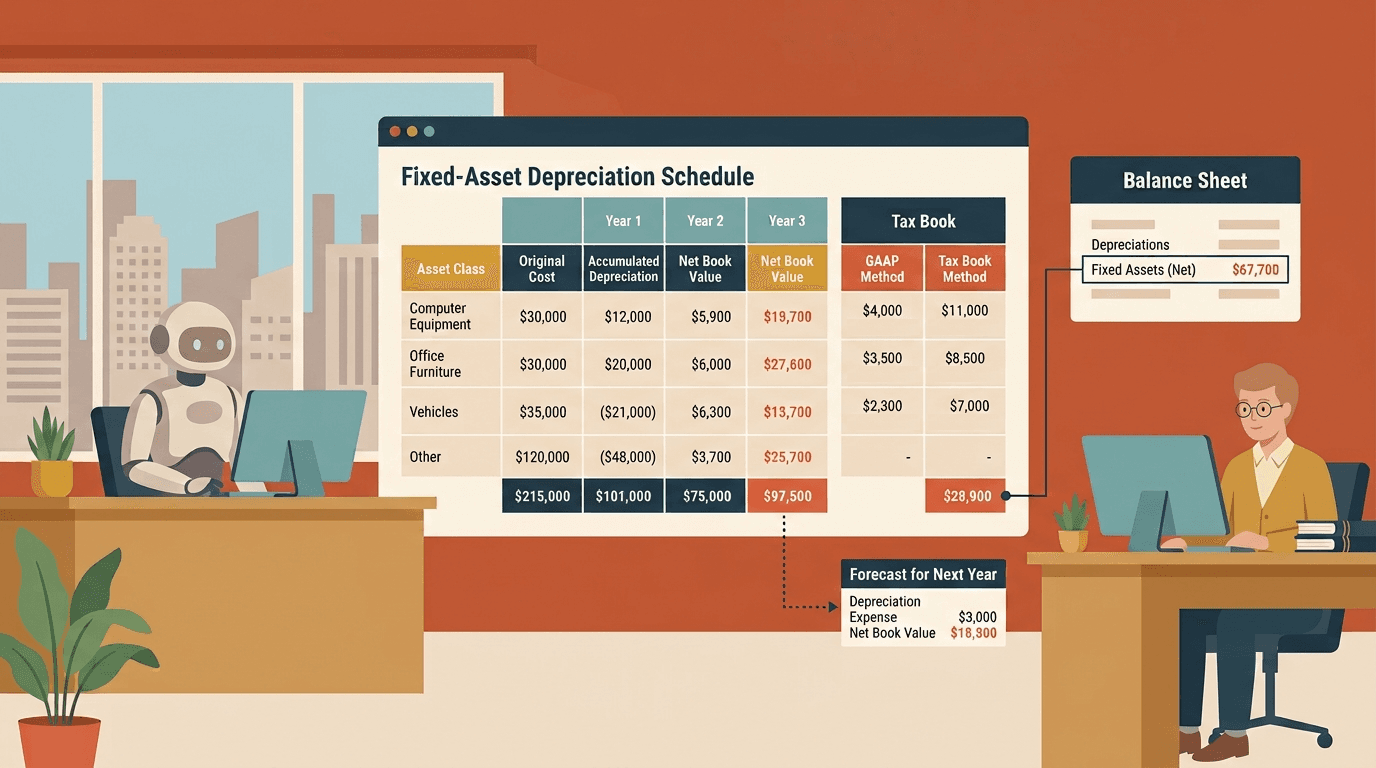
Xero Fixed Asset Register: 6 Limits and 3 Workarounds
A depreciation schedule that agrees with the balance sheet.
Open Xero, go to Accounting → Advanced → Fixed Assets. Register a few assets, set a depreciation method, and run the Depreciation Schedule. For a company with thirty laptops and a delivery van, it does the job. It tracks cost, runs the monthly charge, and posts the journal.
Then year-end arrives, the auditor asks for the fixed asset note, and the whole thing quietly falls over.
Because the Xero fixed asset register is built to depreciate assets, not to report on them. The moment you need a proper depreciation schedule in the format statutory accounts expect — a movement note by asset class, a tax book alongside the accounting book, a forecast of next year's charge — you're back in Excel, rebuilding by hand what the system almost has.
Here's where the native module stops, and what a fixed asset register that actually earns its place looks like.
Where native Xero stops
Six walls show up fast.
Two depreciation methods, and that's the menu. Xero gives you straight-line and diminishing value (plus "no depreciation," "full depreciation at purchase," and, in AU/NZ, pooling). But those are the only two real depreciation curves: no units-of-production for a machine that depreciates by output, no sum-of-the-years'-digits. If your accounting policy doesn't fit one of the two defaults, the register can't model it — so that asset class gets computed outside Xero and journalled back in.
One book for most of the world. Outside Australia and New Zealand, Xero keeps a single depreciation book — the accounting one. There's no separate tax book. So a Singapore company claiming capital allowances, or a UK company tracking writing-down allowances, runs tax depreciation entirely outside Xero. Two parallel schedules, one of which the software never sees.
No splitting an asset, no re-valuing it. A building's roof, lift, and structure wear out at different rates, but Xero treats the building as one item depreciating on one schedule. And if an asset needs to be re-marked to what it's now worth, Xero can't reflect that either. It only handles the straightforward case: one asset, cost less depreciation. Anything more nuanced lives in a spreadsheet.
The register drifts from the balance sheet. This is the one that bites at year-end. Post a journal straight to the fixed asset or accumulated depreciation account — a manual adjustment, an opening balance, a disposal someone booked by hand — and it never touches the register. Now the Fixed Asset Reconciliation report shows a difference, and someone spends an afternoon hunting for why the register says $412,000 and the balance sheet says $418,500. Xero ships a whole reconciliation report precisely because this drifts.
The schedule isn't in the format you need. Xero's Depreciation Schedule does show movements — you can group it by asset type, with opening balances, additions, disposals, closing balances and accumulated depreciation. What it doesn't give you is that data laid out as the movement note statutory accounts and audit files expect: opening cost, additions, disposals, closing cost — then opening accumulated depreciation, the charge, disposal write-back, closing accumulated depreciation — and net book value at both ends, presented by asset class. The numbers are in there; the statutory presentation isn't, so you still reshape it by hand. And if any asset had its settings changed mid-life, Xero tells you to run the schedule one financial year at a time or assets show up twice.
Draft assets are invisible, and scale runs out. Assets sitting in the draft register don't appear in reports until you register them — easy to miss at cut-off. And while Xero sets no hard limit, the module gets sluggish and unwieldy once a register runs into the hundreds or thousands of assets. A manufacturer or a property group blows past that quickly.
None of these make Xero's module bad. For a small company that needs accounting depreciation on a few dozen assets, it's genuinely fine. It's built for the bookkeeper who wants the monthly charge posted correctly — not for the accountant who has to produce the note, the tax schedule, and the forecast.
What hitting the wall looks like
A few patterns we see over and over.
The accounting firm drafting unaudited accounts. The client's statutory accounts need a property, plant and equipment note in the exact movement format — by class, with additions and disposals columns. Xero's Depreciation Schedule doesn't produce it. So the senior rebuilds the note in Excel from a register export, every set of accounts, for every client. Senior rates for junior work, repeated.
The finance manager at a manufacturer. Eight hundred assets, several depreciating by usage, not time. Half the register is maintained in Xero, half in a spreadsheet because the methods don't fit — and the two disagree by year-end. The reconciliation is a recurring Friday.
The CFO building next year's budget. They need a depreciation forecast — the charge by month for the next 24 months, including assets not yet purchased. Xero only knows the past and the present; there's no forward schedule. So depreciation gets hand-modelled into the budget, and never quite ties to the budget vs actual report later.
The Singapore or UK company doing tax. Capital allowances follow different rules and rates than accounting depreciation, and Xero keeps no tax book for them. The entire tax schedule — additions, first-year allowances, pools, balancing charges on disposal — lives in Excel, reconciled to Xero once a year and hoped-for in between.
The group controller. Three entities, three separate fixed asset registers, no consolidated PPE note. Producing a group movement schedule means exporting each register and stitching them together by hand — the same structural problem as multi-entity consolidation everywhere else in the accounts.
What a good fixed asset register actually looks like
Across the registers and schedules we've rebuilt, the same properties show up in the ones that survive an audit and a budget cycle:
-
A movement schedule by asset class. Opening cost, additions, disposals, closing cost; opening accumulated depreciation, charge, disposal write-back, closing accumulated depreciation; NBV at both ends. The statutory note, generated — not retyped.
-
A depreciation forecast. The charge projected forward by month, on existing assets and on planned capex, so the number that lands in the budget comes from the register instead of a guess.
-
Accounting and tax books side by side. One register, two schedules — accounting depreciation and capital allowances — computed off the same asset list, so they never silently diverge.
-
Methods that match your policy. Units-of-production, componentised useful lives, revaluation where the standard demands it. The register should bend to the accounting policy, not the other way round.
-
A tie-out to the balance sheet, built in. The register reconciles to the fixed asset and accumulated depreciation accounts every period, and flags the difference the moment a rogue journal creates one — before the auditor does.
-
Custom asset classes mapped to the statutory note. Your classes, grouped the way the accounts present them, not the way Xero's asset types happen to fall.
-
A group rollup. One consolidated register and one PPE note across every entity, by ultimate asset class — not a per-org export you assemble by hand.
-
Drill-back to the asset and the bill. From a class total to the individual asset, and from the asset to the original purchase invoice in Xero. A question in a review is one click, not a morning.
The workarounds, ranked
-
Maintain the register in Excel alongside Xero. The default. Recompute depreciation, build the movement note, tie it to the balance sheet, redo it every disposal and every year-end. Works. Breaks on mid-year additions, method changes, and the day the person who owns the sheet goes on leave.
-
Buy dedicated fixed asset software. AssetAccountant, Asset Guru, and friends handle multi-book, tax, and componentisation properly. Worth it if fixed assets are a big part of your world — but it's another subscription, another sync to keep clean, and another place your numbers live.
-
Build the schedule off the Xero API. Pull the asset list and book depreciation from the Assets API — plus the posted depreciation journals from the Accounting API — and generate the movement note and forecast yourself. More upfront work; no re-templating when the business changes. Read Building Custom Reports with the Xero API before you commit to doing it in-house — the gotchas are real.
Where Cheetah fits
A fair few of our engagements start with an accountant showing us the fixed asset tab of a year-end file: a hand-built movement schedule, a tax column bolted on the side, and a reconciliation that broke when someone journalled a disposal directly to the GL. We rebuild it — the movement note in statutory format, the accounting and tax books side by side, a forward depreciation schedule for the budget, tied back to the balance sheet and drilling down to each asset — as a report that pulls live from Xero and regenerates itself every period. It's the same idea behind proper monthly management accounts: Xero holds the data, but the report lives in a layer on top.
If the fixed asset note is the part of year-end everyone dreads, Cheetah is probably worth twenty minutes.
The short version
Xero's fixed asset module is built to depreciate assets and post the journal — and at that, for a small register, it's fine. But a depreciation schedule that an auditor accepts, a tax book, a group PPE note, and a forecast for the budget are all reports Xero's register wasn't built to produce. The data is sitting in your file. Turning it into the schedule you actually need is a build-a-layer problem, not a wait-for-Xero one. If you want the full menu of ways to get there, we laid them out in Xero Custom Reports: 5 Ways to Build Them in 2026.

A finance professional turned product builder, Jarvin has built hundreds of reports by hand and knows what financial and operational reporting demands: customisability, auditability, scalability, and security. Having automated that work reliably, he's now helping advisory firms and finance teams do the same.
